Close Menu
TechCentralTechCentral

    Subscribe to the newsletter

    Get the best South African technology news and analysis delivered to your e-mail inbox every morning.

    Facebook X (Twitter) YouTube LinkedIn
    WhatsApp Facebook X (Twitter) LinkedIn YouTube
    TechCentralTechCentral
    • News
      What happens when AI no longer needs us to improve

      What happens when AI no longer needs us to improve

      5 June 2026
      The biggest IPO ever is also one of the riskiest - SpaceX

      The biggest IPO ever is also one of the riskiest

      4 June 2026
      The MVNO trap deepens as the battle moves to data

      The MVNO trap deepens as the battle moves to data

      4 June 2026
      BMW's Pretoria hub built the AI now running on its factory floors worldwide - Peter van Binsbergen

      BMW’s Pretoria hub built the AI now running on its factory floors worldwide

      4 June 2026
      Nedbank, Jumo bet on AI lending for the underbanked - Mutsa Chironga

      Nedbank, Jumo bet on AI lending for the underbanked

      4 June 2026
    • World
      Meta takes on OpenAI and Anthropic in enterprise AI

      Meta takes on OpenAI and Anthropic in enterprise AI

      4 June 2026
      Astronomers discover exoplanets with magnetic fields

      Strange winds reveal magnetic fields on distant ‘hot Jupiters’

      2 June 2026
      AI giant Anthropic files for landmark US listing

      AI giant Anthropic files for landmark US listing

      1 June 2026
      Dell guns for MacBook Neo with low-cost laptop

      Dell guns for MacBook Neo with low-cost laptop

      1 June 2026
      Nvidia's first CPUs to debut in Windows laptops this week

      Nvidia CPUs to debut in Windows laptops this week

      31 May 2026
    • In-depth
      What Wi-Fi 8 will mean for wireless networks

      What Wi-Fi 8 will mean for wireless networks

      1 June 2026
      Alfa's electric rebel - Alfa Romeo Junior Elettrica Veloce

      Alfa’s electric rebel

      29 April 2026
      Africa switches on as Europe dims the lights

      Africa switches on as Europe dims the lights

      9 April 2026
      The biggest untapped EV market on Earth is hiding in plain sight

      The biggest untapped EV market on Earth is hiding in plain sight

      1 April 2026
      AI, cybersecurity power standout year for Datatec - Jens Montanana

      The R16-billion tech giant hiding in plain sight

      26 March 2026
    • TCS
      TCS | Charge's R1.8-billion bet on an off-grid EV future - Charge chairman Joubert Roux

      TCS | Charge’s R1.8-billion bet on an off-grid EV future

      18 May 2026
      TCS+ | The Up&Up Group on the hidden cost of AI - Jason Harrison

      TCS+ | The Up&Up Group on the hidden cost of AI

      13 May 2026
      Michael Rossouw

      TCS+ | The retirement decision most South Africans get wrong

      6 May 2026
      TCS | The Cape Town start-up listening for TB with AI - Braden van Breda

      TCS | The Cape Town start-up listening for TB with AI

      4 May 2026

      TCS+ | ‘The ISP for ISPs’: Vox’s shift to wholesale aggregator

      20 April 2026
    • Opinion

      Clashing judgments leave South Africa’s crypto law unsettled

      2 June 2026
      The author, Pambos Soteriades

      The trap inside South Africa’s banking MVNO boom

      1 June 2026
      The hidden cost of social media age bans is everyone's privacy - Petrus Potgieter

      The hidden cost of social media age bans is everyone’s privacy

      29 May 2026
      Treasury's crypto crackdown is a betrayal of Mandela's promise - Duncan McLeod

      Treasury’s crypto crackdown is a betrayal of Mandela’s promise

      22 May 2026
      South Africa is sleepwalking into another AI policy failure - Celeste Labuschagne

      South Africa is sleepwalking into another AI policy failure

      20 May 2026
    • Company Hubs
      • 1Stream
      • Africa Data Centres
      • AfriGIS
      • Altron Digital Business
      • Altron Document Solutions
      • Altron Group
      • Arctic Wolf
      • Ascent Technology
      • AvertITD
      • BBD
      • Braintree
      • CallMiner
      • CambriLearn
      • CM Telecom
      • Contactable
      • CYBER1 Solutions
      • Digicloud Africa
      • Digimune
      • Domains.co.za
      • ESET
      • Euphoria Telecom
      • HOSTAFRICA
      • Incredible Business
      • iONLINE
      • IQbusiness
      • Iris Network Systems
      • Kaspersky
      • LSD Open
      • Mitel
      • NEC XON
      • Netstar
      • Network Platforms
      • Next DLP
      • Ovations
      • Paracon
      • Paratus
      • Q-KON
      • SevenC
      • SkyWire
      • Solid8 Technologies
      • Telit Cinterion
      • Telviva
      • Tenable
      • Vertiv
      • Videri Digital
      • Vodacom Business
      • Wipro
      • Workday
      • XLink
    • Sections
      • AI and machine learning
      • Banking
      • Broadcasting and Media
      • Cloud services
      • Contact centres and CX
      • Cryptocurrencies
      • Education and skills
      • Electronics and hardware
      • Energy and sustainability
      • Enterprise software
      • Financial services
      • HealthTech
      • Information security
      • Internet and connectivity
      • Internet of Things
      • Investment
      • IT services
      • Lifestyle
      • Motoring
      • Policy and regulation
      • Public sector
      • Retail and e-commerce
      • Satellite communications
      • Science
      • SMEs and start-ups
      • Social media
      • Talent and leadership
      • Telecoms
    • Events
    • Advertise
    TechCentralTechCentral
    Home » Company News » Custom-size paper on your Xerox printer

    Custom-size paper on your Xerox printer

    By Bytes Document Solutions26 July 2019
    Twitter LinkedIn Facebook WhatsApp Email Telegram Copy Link
    News Alerts
    WhatsApp

    Custom-size paper selections can be created at the machine for copies but we will look at creating custom sizes in the print driver for print jobs. You can save the custom size to be used repeatedly. Let us look at the general steps for creating and saving a custom size for paper in the driver.

    Your steps may be slightly different depending on the model of your Xerox printer or multifunction printer and the
    operating system you are using. Depending on your machine, you can print custom-size paper from trays 1–5. Since custom-size paper settings are saved in the print driver, they are available for you to select in all your applications.

    Please check your paper and paper tray specifications for information on the sizes supported for the paper trays on your machine. Custom sizes are most commonly printed from the bypass tray.

    To create a custom paper size in the Windows print driver:

    1. In the print driver, click the Printing Options tab.
    2. Click on the Paper/Output tab.
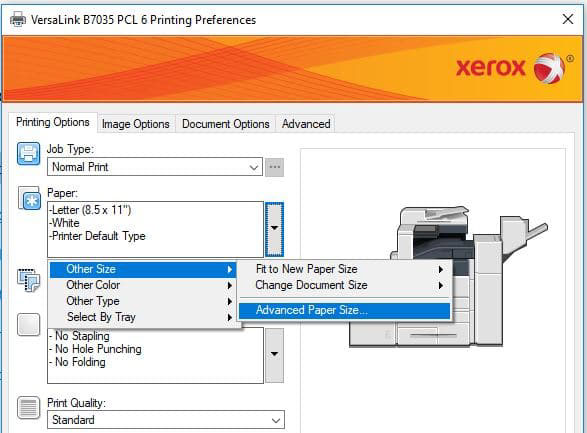
    3. Click on the Paper pull-down menu and select Other Size.
    4. Click on the Advanced Paper Size menu and select New.
    5. Enter a name for the Custom Size in the Name field. Note: This name will be listed in the Paper Size list in the print driver.
    6. Set the Units. If the machine default is inches, select inches; if the machine default is millimetres, select millimetres.
    7. Enter the required height and width in the fields provided. The height and width may be set within the paper size specifications for your model printer.
    8. Then select the units inches or millimetres.
    9. Click on OK three times.

    To print a document on custom size paper using a Windows operating system:

    1. Open the file to be printed, and then select Print from the File menu. The Print
      window will be displayed.
    2. Select the Xerox printer, and then click on Properties or Preferences.
    3. Click on the Paper/Output tab.
    4. Click on the Paper pull-down menu and select Other Size.
    5. Click on the Output Paper Size menu and select the custom paper size created before.
    6. Click on OK to close the windows and print the file.

    To create custom paper size in the Apple macOS X (10.5 or higher) driver:

    1. In the application, click File then Page Setup.
    2. Click Paper Sizes, and then select Manage Custom Sizes.
    3. In the Manage Paper Sizes window, click the plus sign (+) to add a new size.
    4. Double-click Untitled at the top of the window and type a name for the new custom size.
    5. Enter the height and width of the new custom size.
    6. Click the arrow to the right of the Non-Printable Area field and select the printer from the drop-down list. Or set the top, bottom, right, and left margins for User Defined margins.
    7. Click OK to save the settings.

    To print a document on custom size paper using macOS:

    1. Open the file to be printed, and then select Page Setup from the File menu.
    2. Select the required printer from the Format For pull-down menu.
    3. Select the required custom paper size from the Paper Size pull-down menu.
    4. Click on OK.
    5. Select Print from the File menu. The Print window will be displayed.
    6. Select any required printing options.
    7. Click on the Print button to send the job to the printer.

    Those are the basic steps, the steps may differ a little depending on the machine you are using. These instructions are presented to help you to know where to look in your driver for the custom setup. If you need further information or help, please search the online support for your model of machine or contact your local support centre.

    About Bytes Document Solutions
    Altron Bytes Document Solutions (BDS) is Africa’s leading document management technology and services company and the largest Xerox distributor in the world. It is the authorised Xerox distributor in 26 sub-Saharan countries offering the complete range of Xerox document equipment, software solutions and services. BDS forms part of JSE-listed Allied Electronics Corporation (Altron).

    • This promoted content was paid for by the party concerned

    Follow TechCentral on Google News Add TechCentral as your preferred source on Google


    Altron Altron BDS Bytes Document Solutions Xerox
    WhatsApp YouTube
    Share. Facebook Twitter LinkedIn WhatsApp Telegram Email Copy Link
    Previous ArticleNaspers leads $30-million funding round in Brainly
    Next Article Google posts strong results as antitrust scrutiny looms

    Related Posts

    Threat actors don't hack in anymore - they log in - Altron Digital Business Microsoft South Africa

    Threat actors don’t hack in anymore – they log in

    27 May 2026
    Altron walked away from multiple M&A deals - Werner Kapp

    Altron walked away from multiple M&A deals

    25 May 2026
    Altron expects big jump in full-year earnings - Werner Kapp

    Altron surprises with special dividend

    25 May 2026
    Company News
    Payments Live returns to Johannesburg for 2nd edition

    Payments Live returns to Johannesburg for 2nd edition

    4 June 2026
    Finding the next Sandton - AfriGIS

    Finding the next Sandton

    3 June 2026
    How telematics keeps fleets safe, efficient and compliant - Tracker

    How telematics keeps fleets safe, efficient and compliant

    3 June 2026
    Opinion

    Clashing judgments leave South Africa’s crypto law unsettled

    2 June 2026
    The author, Pambos Soteriades

    The trap inside South Africa’s banking MVNO boom

    1 June 2026
    The hidden cost of social media age bans is everyone's privacy - Petrus Potgieter

    The hidden cost of social media age bans is everyone’s privacy

    29 May 2026

    Subscribe to Updates

    Get the best South African technology news and analysis delivered to your e-mail inbox every morning.

    Latest Posts
    What happens when AI no longer needs us to improve

    What happens when AI no longer needs us to improve

    5 June 2026
    The biggest IPO ever is also one of the riskiest - SpaceX

    The biggest IPO ever is also one of the riskiest

    4 June 2026
    The MVNO trap deepens as the battle moves to data

    The MVNO trap deepens as the battle moves to data

    4 June 2026
    BMW's Pretoria hub built the AI now running on its factory floors worldwide - Peter van Binsbergen

    BMW’s Pretoria hub built the AI now running on its factory floors worldwide

    4 June 2026
    © 2009 - 2026 NewsCentral Media
    • Cookie policy (ZA)
    • TechCentral – privacy and Popia

    Type above and press Enter to search. Press Esc to cancel.

    Manage consent

    TechCentral uses cookies to enhance its offerings. Consenting to these technologies allows us to serve you better. Not consenting or withdrawing consent may adversely affect certain features and functions of the website.

    Functional Always active
    The technical storage or access is strictly necessary for the legitimate purpose of enabling the use of a specific service explicitly requested by the subscriber or user, or for the sole purpose of carrying out the transmission of a communication over an electronic communications network.
    Preferences
    The technical storage or access is necessary for the legitimate purpose of storing preferences that are not requested by the subscriber or user.
    Statistics
    The technical storage or access that is used exclusively for statistical purposes. The technical storage or access that is used exclusively for anonymous statistical purposes. Without a subpoena, voluntary compliance on the part of your Internet Service Provider, or additional records from a third party, information stored or retrieved for this purpose alone cannot usually be used to identify you.
    Marketing
    The technical storage or access is required to create user profiles to send advertising, or to track the user on a website or across several websites for similar marketing purposes.
    • Manage options
    • Manage services
    • Manage {vendor_count} vendors
    • Read more about these purposes
    View preferences
    • {title}
    • {title}
    • {title}