 Many organisations are in the middle of a work from home trial by fire. What are the security implications of this abrupt change? And which cybersecurity best practices are most critical to make this abrupt change both seamless and secure?
The dependence on emergency remote working will forever be part of most organisations’ cyber-resilience strategy — part of the IT and security new normal. If your organisation can effectively work from home (WFH), you should feel very fortunate, as many industries largely cannot – such as airlines, hotels, cruise lines, and manufacturing firms – to name a few.
The bottom line is that your IT and security systems should be an enabler of remote working and not an inhibitor.
To make working from home more seamless and more secure this article provides 13 key recommendations, some of which can be implemented in short order, while others require an evolution of both IT and security strategies and new investments to make happen. These recommendations were drawn from Mimecast’s own experiences as a global cybersecurity company, insights from industry analysts, and perspectives drawn from members of the Cyber Resilience Think Tank.
You will see that a number of these recommendations revolve around leveraging the cloud for everything, both for IT and security. One clear takeaway is that without the cloud and its inherent scalability, accessibility, geographic diversity and resilience, we would be lost. Imagine experiencing this work-from-home rush 10 years ago!
 Mark O’Hare, the chief information security officer at Mimecast, summed up Mimecast’s own WFH experience as “In Cloud We Trust”, as the company has been implementing its own cloud-first strategy for IT and security for years, both in preparation for an emergency as well as for the daily support of our highly mobile, global and permanent home-working staff. The shift to a 100% remote-working strategy has been relatively seamless and has enabled the Mimecast team to focus on the “softer” needs of quarantined Mimecasters. But more on those needs at the end of this article.
Recommendations
1. Review each business function’s key applications and business processes and assess each for remote work readiness and security.
Craft a strategy and supporting systems as needed for each business function. But “not possible to work from home” is not an acceptable answer. Because in an emergency, “not possible” is not possible.
However, it is reasonable to plan to operate in a degraded mode if full functionality of the business process is too expensive or complicated to run remotely. A key goal is to not be surprised by your plan when the disruption hits. The only other option is to stop conducting that business function or to try and get that portion of your business declared as “critical” from your local political leaders.
2. Consume every application from the cloud.
Cloud first, second and third should be the default. We really are running out of applications that can’t be hosted in and consumed from the cloud. If we have learned one thing from this rapid move to remote work, it’s that the cloud was ready — both software as a service and infrastructure as a service. The Internet is resilient, the home networks for many employees are excellent, and the cloud service providers were ready for the increased load.
If an existing, critical application can’t be moved to the cloud, start the process of getting a new, cloud-based application to take its place. In the meantime, the users of the remaining on-premises applications should be the priority for continued VPN access. But over time your use of VPNs should diminish dramatically.
Note: Do keep in mind that some countries block access to certain cloud applications and not everyone, everywhere has inexpensive access to fast and reliable Internet, so plan accordingly.
 3. Use cloud-based or at least cloud-centric security solutions for every cybersecurity control.
Make sure your cybersecurity controls – network, Web, e-mail, endpoint, identity management, authentication, access management, SIEM/SOAR — are fully functional without regard to the users’ location (that is, ensure they are cloud based). As you complete your transition away from on-premises IT applications and data, you can simultaneously move away from on-premises security controls. They will become increasingly less valuable anyway.
Cloud-based security controls reduce and then ultimately eliminate the need for backhauling traffic from remote offices or using VPNs to enforce and monitor security. Start with the security controls in use by your everyday users – such as authentication and SSO – and move to more specialised teams, such as IT and security, over time.
4. Issue corporate laptops/mobile devices and use mobile device management for users’ own devices.
The only way to effectively secure the endpoint is to either own it (by issuing the laptop and including endpoint security on it) or to secure the business application portion of it via mobile device management (MDM).
Attempting to secure your employee-owned PCs entirely can run into complexity and privacy issues that are hard to overcome. Just bite the bullet and issue the laptop and use MDM as needed for mobile devices.
Also, make sure all your software updates, security and helpdesk functionality can be accomplished without requiring direct connectivity to the corporate network. And don’t forget hardware support for new and existing staff. Have a process to issue new hardware and do break fixes using courier companies, not by requiring visits to the office. These processes of course will also help with supporting permanently remote employees during normal times.
5. Use multi-factor authentication.
No excuses. With data and applications in the cloud (or clearly headed that way), the loss of a single, SSO-enabled credential is the death knell to security. With that single credential, a malicious actor would literally have access to everything as that user. In addition, the risk of account takeover during normal times can be largely addressed by using multi-factor authentication. And the associated SSO service makes application access incredibly easy for your employees no matter where they are.
 6. Integrate your cloud security control activity, threat intelligence, and security telemetry into a centralised threat detection and response system (SIEM/SOAR), that is also cloud-based.
Don’t use security controls that do not provide enough APIs and off-the-shelf integrations to get this done. The cloud should not replicate the silo problem that has become so prevalent in the world of on-premises security controls. Just because your security controls are operated in the cloud, does not mean you should lose visibility and investigative use of them.
7. Help employees properly secure their home networks.
Employees’ home networks are part of your business continuity programme, so treat them as such. Discourage the use of default admin passwords on their routers and the use of weak or easily guessable Wi-Fi access passwords. No, your house number or phone number is not a good Wi-Fi password! And require your staff to have a minimally performing home network at the ready — whether wired or satellite based. And have them be prepared to tether to their mobile devices for backup access to the Internet. With the impending arrival of 5G mobile networks, this part of the equation will become increasingly cost effective.
8. Be ready to intensify, personalise and leverage the automation of your security awareness training programme.
Remember, with remote working, it is much harder for your staff to ask their office mate for security advice, as their office mate is more likely to be a dog, cat, child or significant other. And those office mates are usually not much help when it comes to security decisions. You need to keep your teams’ heads in the security game. Regular and topical security awareness training videos are a great way to do that. Regular communication is key!
9. Have a clear process for employees, and customers/partners if relevant, to report potential security issues they come across.
As your last line of defence, people can be a very effective security early-warning system. And, of course, have a process on the back end for your helpdesk and security team to collect, manage, triage, investigate, and act on their reports.
10. Use the heck out of cloud-based collaboration tools all the time.
Examples of these include Zoom and Slack, but also use their built-in security settings (to avoid unauthorised access, for example). This way, your staff are already using the tools that they will rely on when they work from home. No ramp-up required. If you don’t supply collaboration tools as part of your standard IT package, your employees will use whatever is free or cheap out there to keep doing their job, which means you will lose security visibility and control.
11. Don’t forget your IT and security teams. They must be able to work as remotely as everyone else in the organisation.
Did you build a security operations centre in a room with a big screen and which assumes everyone is in the same room? Do your IT and security staff require direct or local access to administer systems?
See recommendations 1 to 3 above, but in the meantime continued VPN access is acceptable for these folks if you must. Also, watch out for team burnout. Reemphasise that working from home doesn’t mean working 24×7.
And don’t forget onboarding of new security staff (similar problem with all staff really). The natural process of learning “who and what” by osmosis can’t happen when everyone is working remotely, so plan for remote onboarding of new staff. Even if you aren’t hiring during an emergency, it is very possible that increased job sharing and shift work during the crisis will bring people into roles that they don’t normally do.
 12. Run regular tests of working from home when not in the midst of an emergency.
Work out a week every year where everyone at your organisation works at home, with no exceptions.
Granted you probably can’t spring this on your staff, unlike during a real emergency. Pick a week that makes sense and work it out with management and declare that week every year as the work at home week for the whole organisation. Testing is key to improving resilience.
Also, if needed, liberalise your non-emergency work-at-home policies so that your remote working systems are tested continuously throughout the year and your people become used to it before there is an emergency.
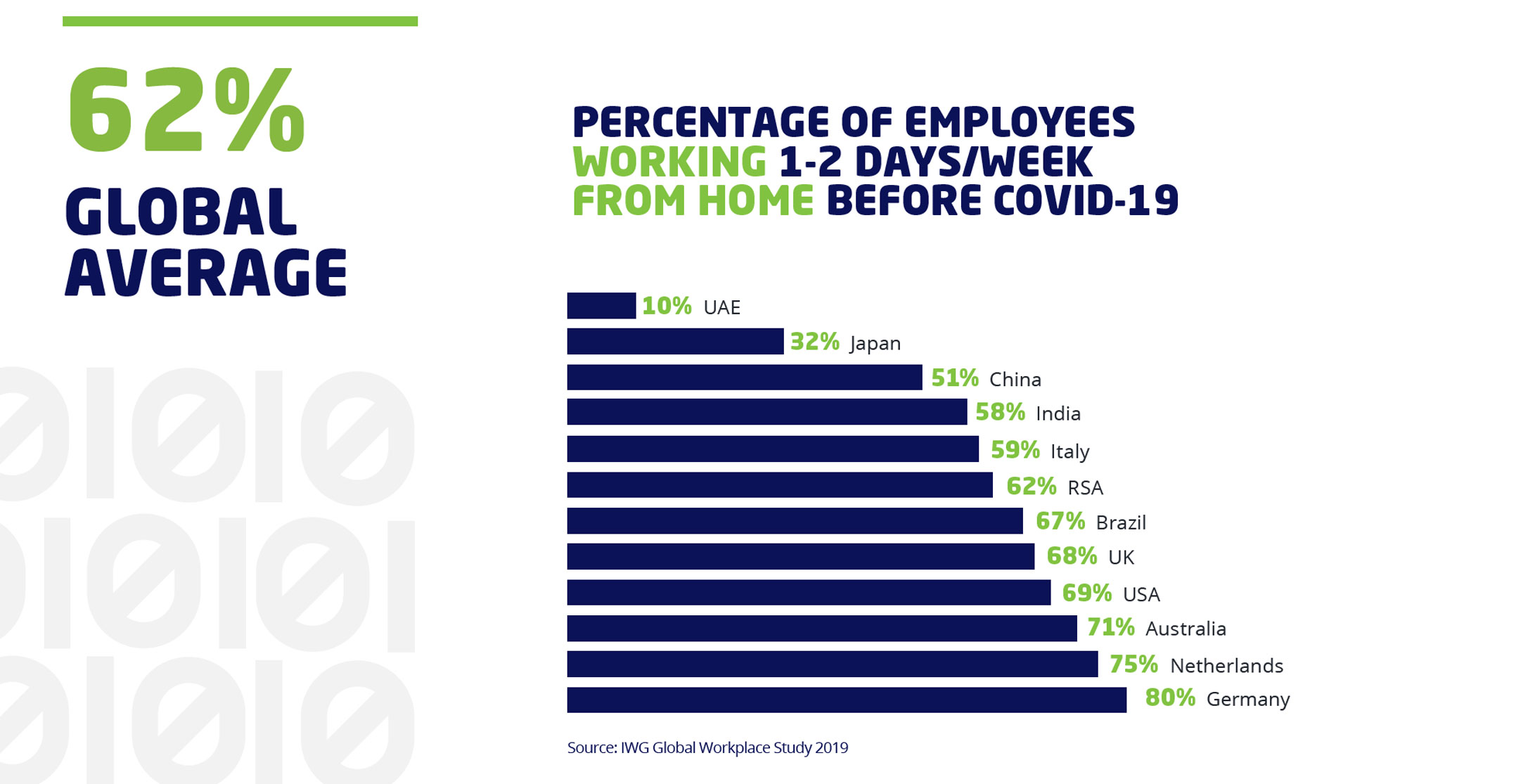
In many regions, regular WFH is already very common – with a global average of 62% working from home one or two days per week pre-pandemic, but in some regions less so. Compare your organisation to the statistics in the previous graphic and seriously consider taking steps towards moving your organisation further to the right during regular times. It will pay dividends during work from home emergencies.
13. When things calm down from the current crisis (and they will), make sure you conduct a comprehensive retrospective.
This is important so that learnings can be recycled back into your programme and guide future investments. And do this as well after your annual work-from-home tests. For extended disruptions, conducting selective mid-action reports can help guide mid-course corrections. Frame these assessments, whether during or after the event, by people, processes and technology, to best discover your key strengths and weaknesses.
Bonus recommendation
If you do well at the above, your IT and security systems and processes won’t be your primary challenges in a rush to work from home. How to keep your staff from going crazy when isolated at home and how to keep everyone emotionally and culturally connected will surface to the top of your priority list. Let the creativity flow to make this happen.
Lastly, here are some ideas to address the social isolation problem from the Mimecast team:

- This promoted content was paid for by the party concerned