Every year, Apple’s iMac line-up gets slightly faster processors, better graphics cards, faster RAM and more storage space. And although the 2013 iMac was one of the first Apple computers to incorporate the new Broadwell micro-architecture, it still wasn’t a huge step up since no groundbreaking new features emerged as a result.
This time around, instead of focusing on faster hardware, Apple has decided to bring its Retina screen technology – already on the iPhone, iPad and some MacBook Pros – to the big screen of the 27-inch iMac.
As a result, the new 2014 iMac Retina boasts more than 5 000 pixels (5K) in screen width. In order to manage those pixels, the new iMac is equipped with an AMD Radeon R9 M290X GPU by default. There is also the option to fit it with the even faster R9 M295X. The specific iMac model I used for this review had an Intel Core i7-4790K CPU, AMD R9 M295X GPU, 8GB of RAM and a 1TB Fusion Drive. Models with other specs will naturally produce deviating benchmark results.
Design: nothing new
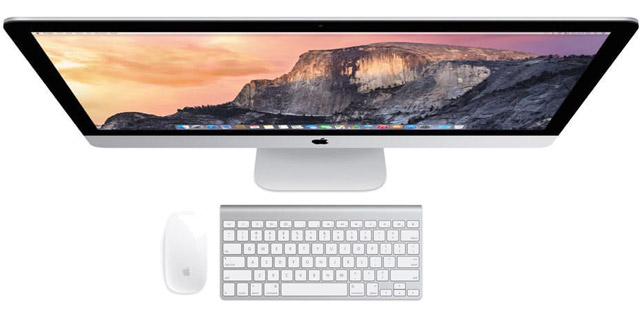
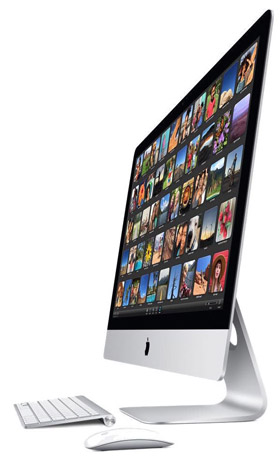
The new iMac Retina 5K, which will not replace all the non-Retina iMacs but which is rather a new high-end addition to the range, looks identical to the late 2013 27-inch iMac. They share the exact same well-built exterior and both use a solid aluminium stand to support the huge screen. Behind that screen, nicely out of sight, is where all the hardware is stationed. The speakers are located under the screen.
The iMac Retina 5K weighs about 9,5kg and is well balanced. This makes it easy (and safe) to tilt the screen to suit your preferred viewing angle. It measures almost 52cm in height, 65cm in width and is 20,3cm deep. On the back of the iMac Retina 5K is a cooling exhaust and a small lid that can be removed to easily upgrade the internal memory.
 All the connectors that you would needed to hook it up to peripherals and accessories are also positioned on the back. This makes accessing them a bit difficult, but keeps the front of the iMac Retina 5K looking spick-and-span. At first glance, all the connectors on the back also seem unchanged from the 2013 model. After further inspection, Apple replaced the two Thunderbolt 1.0 interfaces with Thunderbolt 2.0 versions, doubling their bandwidth from 10Gbit/s to 20Gbit/s. In addition, there are four USB 3.0 connectors, a headphone jack, an SDXC card reader and a gigabit Ethernet connector.
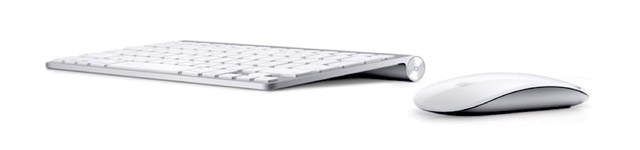
Like the exterior of the iMac Retina 5K, the keyboard and mouse have also remained exactly the same. The iMac Retina 5K comes with a compact and minimalistic Apple wireless keyboard and multi-touch-enabled Magic Mouse. Both function on two AA batteries and use Bluetooth to connect to the iMac. Both the keyboard and mouse are comfortable to use and easily facilitate long hours of typing or browsing.
Hardware: quad core and Fusion Drive
The iMac Retina 5K is available in two processor versions, both of which use four cores to get the job done. There is the one with a 3,5GHz Intel Core i5-4690 and then there’s the faster but more expensive 4GHz Intel Core i7-4790K version. While previous iMacs were equipped with Nvidia GPUs, the 2014 iMac Retina 5K uses the AMD Radeon R9 M290x chip in combination with 2GB of GDDR5 dedicated video memory. Serious gamers can also upgrade to the more expensive but faster AMD Radeon R9 M295X chip that boasts 4GB of dedicated GDDR5 video memory.
The entry-level configuration of the iMac Retina 5K comes with 8GB of RAM (1,6GHz; DDR3), but power users can opt for 16GB or even 32GB. To store the operating system, programs and user files, the iMac Retina 5K uses a 1TB Fusion Drive, with a 3TB version as optional. This relatively new hybrid drive combines the fast performance of flash storage typically found in SSD devices with the low-cost capacity of regular hard drives. Apple’s Mac OS X seamlessly uses the faster 128GB flash storage part for the operating system while all other files are automatically stored on the conventional hard drive section. The beauty is that no configuration is necessary — OS X does it all automatically and in the background.
Generic benchmarks: fastest of all iMacs
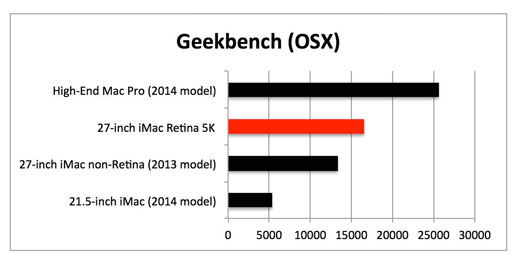
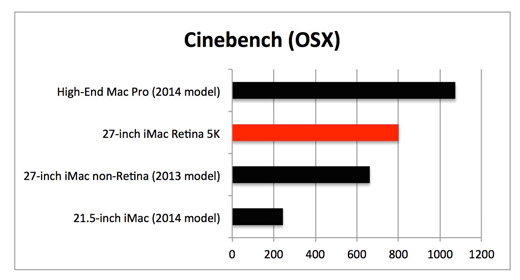
To find out how the review model of the Apple iMac Retina 5K performed in real life, I ran a set of benchmark tests to measure the speed of the CPU, GPU and RAM. I compared the iMac Retina 5K to three other Apple machines. The first one was a very high-end Mac Pro equipped with an octa-core Intel Xeon CPU, 32GB of RAM and an AMD FirePro D700 video card. The second device I compared the new iMac Retina 5K to was a late 2013 non-Retina 27-inch iMac that houses an Intel Core i7-4771 CPU, 32GB of RAM and an Nvidia GeForce GTX 780 graphics card. Finally, I stacked it up against a fairly standard mid-end 21,5-inch iMac fitted with an Intel Core i5-4570R CPU, 8GB RAM and an Intel Pro Graphics 5200 GPU.
The first benchmark tool I used to quantify the actual performance of the iMac Retina 5K was Geekbench. It simulates real-world business and consumer scenarios to determine the (multi-core) processing power of a system. Geekbench made it clear that the iMac Retina 5K is considerably faster than the other iMacs, but obviously can’t keep up with the octa-core Mac Pro.
I then ran Cinebench, a program that measures the maximum performance of the central and graphics processor during heavy workloads. It aims to use all available processor cores to render complex images. Also, it factors in the quality and speed of the RAM. Cinebench confirmed what Geekbench had shown earlier: the iMac Retina 5K performs a lot better than earlier iMac models, but is no match for the high-end Mac Pro.
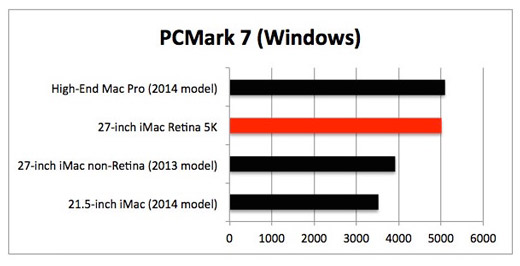
Finally, I used PCMark 7 to further map the performance of the iMac Retina 5K. Since this software only runs on Windows, I had to use OS X’s Bootcamp feature to install Windows 8.1 and all relevant drivers onto the iMac Retina 5K. PCMark 7 showed me that the iMac Retina 5K and the high-end Mac Pro put down near identical scores. Since the Mac Pro has 4 extra cores, it should have performed considerably better. I suspect that PCMark 7 is unable to correctly handle more than four cores per benchmark run. But the fact remains that the new iMac Retina 5K is considerably faster than the older iMac models used during this review.
Graphics benchmarks: ideal for gaming
To successfully control all the pixels of the new Apple iMac Retina 5K, my review model was fitted with the optional AMD Radeon R9 M295X video card.
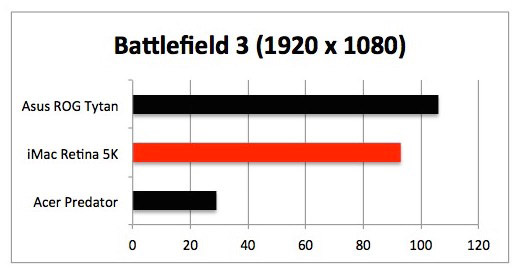
To test the graphical capabilities, I compared it to two dedicated gaming desktop systems, the Asus ROG Tytan (Core i7-4770 CPU; 16GB RAM; Nvidia GTX 770) and the Acer Predator AG3-605-UR1C (Core i5-4440; 8GB RAM; Nvidia GTX 745). All graphics benchmarking was done in Windows 8.1; test scores are presented in frames per second (fps), where higher is better.
The first game I used to determine the graphics performance was Battlefield 3, which I ran in 1 920×1 080-pixel resolution with graphics details manually set to high. It showed me that the iMac Retina 5K could render just over 90fps, slightly less than the Asus gaming desktop.
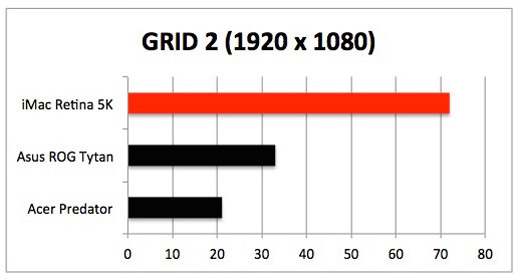
The second benchmark game, GRID 2, was also manually set to 1 920x 1 080 resolution with graphics in ultra-mode and 4x multi-sample antialiasing to make the test systems really sweat. This time the iMac Retina 5K put both other gaming systems to shame. There is a valid reason, however: GRID 2 has been optimised for AMD GPUs, so both Nvidia-based gaming desktops are at a significant disadvantage here.
Running Windows: serious limitations
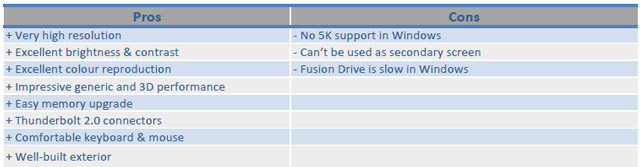
When Apple finally made the switch from PowerPC to Intel processors in 2006, it paved the way for the Windows operating system to be installed onto Macs. By using Apple’s own Bootcamp technology and a Windows install disc, getting Windows on any modern Mac is a breeze. Apple even supplies all the Windows drivers for Mac specific hardware. Unfortunately, there are some serious limitations when running Windows on this new iMac Retina 5K.
The Fusion Drive is not able to use its caching function due to restrictions and limitations of the Windows kernel and/or the Bootcamp drivers. As a result, the hard drive performance under Windows is considerably lower than when used with Apple’s OS X. There is also no way to set the resolution any higher than 3 840×2 160 pixels, meaning you can’t run Windows in the screen’s native resolution of 5 128×2 880. Since fewer pixels are displayed than physically present within the screen, scaling artefacts appear. It’s not the end of the world, but they are visible to the keen eye.
The screen: plenty of pixels
In recent years, most smartphones, tablets and notebooks have received substantial increases in screen resolution. 2014 treated us to smartphones with 1 440p resolutions and notebooks that support the 4K standard.
The two biggest advantages of even higher resolutions, especially with traditional computers, are more usable space on your desktop and sharper images and text. With mobile devices like smartphones and their relatively tiny screens, the advantages of more pixels, on the other hand, are quite limited. If you take a 5-inch smartphone, for instance, the difference between a 2 560×1 400-pixel and a 1 920×1 080-pixel resolution will prove unnoticeable to the naked eye.
With traditional desktop systems like the standard Apple iMac, individual pixels can, however, be detected by the naked eye. The non-Retina iMac features a resolution of 2 560×1 440 spread over a 27-inch display, which looks pretty sharp at a distance. If you look closer, however, individual pixels can be observed without the help of a magnifying glass.
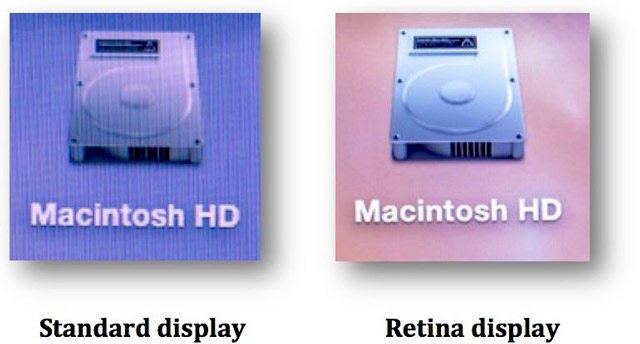

The new iMac Retina 5K quadruples the standard iMac resolution, resulting in a pixel density of 217ppi. But to what end?
To try and answer that question, I put both the non-Retina and the Retina iMacs close together so I could spot differences in display quality. I sat down in front of both systems at about 60cm and used the high-resolution desktop backgrounds that are built into OS X for reference. The results were staggering!
After gazing at the solid and razor sharp image on the Retina 5K Mac for minutes, carefully observing every little detail that previously went unnoticed, I then looked at the same image, but now on the non-Retina iMac. It was like looking through a window that hadn’t been washed for years.
The real difference, however, became clear when I moved in closer to the screens, at a distance of about 15cm. On the OS X desktop, there’s an icon to access the hard drive. When I zoomed in on this icon, I was amazed at the quality difference. The non-Retina screen clearly showed me the individual pixels that make up the icon, including all the rough, jagged edges. The icon on the Retina screen stayed incredibly sharp and there still was no way my eye could see any visible pixels, even when I used a magnifying glass.
One of the main reasons everything looks so incredibly gorgeous on the new iMac Retina 5K is because of OS X’s smart scaling. It’s not only the sheer number of pixels that has been quadrupled on the new iMac Retina 5K, but all the graphical elements that make up the operating system. As a result, and despite the quadrupled resolution, things like icons and text are still displayed in the same size as they are on non-Retina screens, but only a lot sharper and therefore filled with much more detail.
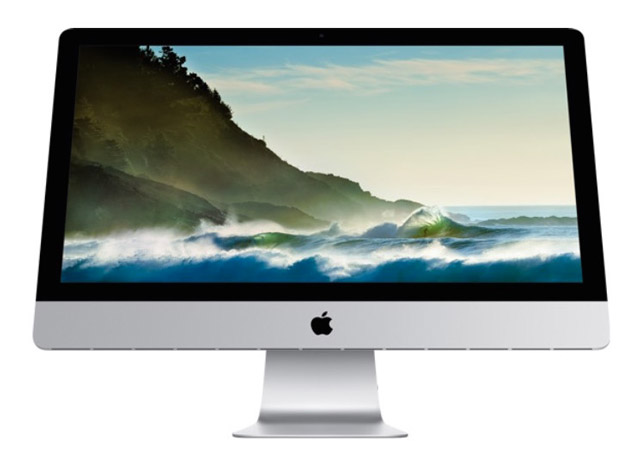
In the end, I was really impressed with the quality and possibilities of the new iMac Retina 5K screen, especially when editing extremely high-resolution video or images since the 5K-screen facilitates showing that footage in its native resolution. There are not many screens than can do that. Apart from that, the high pixel density delivers stunning clarity and razor-sharp images, which are noticeably better than on the standard 27-inch iMac.
I did notice that a feature I often use, called Target Display Mode (TDM), refused to work with the new iMac Retina 5K. TDM allows you to utilise the screen of an iMac as a secondary screen for other Apple computers, effectively expanding the desktop. The only thing you need for that to work is a Thunderbolt cable. TDM is especially useful when viewing multiple spreadsheets, text documents, websites and even games. Unfortunately, the iMac Retina 5K just does not support it, which is a real shame.
 Screen quality: no concessions
Apple’s new 5K-screen houses an incredible number of pixels, making text, icons and images look sharp as a knife. However, it’s not merely the pixel density that determines the quality of a screen. Aspects like brightness, contrast and colour reproduction also play a major role. That’s why I unpacked my Spectracal C6-colorimeter and started measuring those screen properties.
The maximum brightness levels that my colorimeter observed were identical to those of previous iMac models, around 370 candelas per square metre. That’s more than adequate for most situations. Next up was the contrast, essentially the ratio of the luminance of the brightest colour (white) to that of the darkest colour (black). The higher the contrast values, the more vividly and impressively colours are displayed. According to the colorimeter, the new iMac Retina 5K’s contrast is also very good, even slightly higher than Retina Macbook Pro models.
Apple says that it accurately colour calibrates all the 5K screens before they leave the assembly line, so naturally I was curious to find out if my dedicated measuring equipment could indeed verify that claim. And it did — all the primary and secondary colours were well balanced and represented, showing very low colour deviation.
It’s clear the 5K resolution is in no way achieved at the expense of screen brightness, contrast and colour reproduction.
Conclusion
The entry-level 27-inch, non-Retina iMac will set you back R25 000, while the entry-level Retina version will cost you an extra 10 grand. Aside from the quadrupled resolution, you’ll also be treated to a faster CPU, GPU and a Fusion Drive instead of a conventional one.
So, is this new iMac Retina 5K worth the extra hard-earned cash?
You bet it is! But only if you are specifically looking for an extremely high-resolution screen with a noticeably better image quality and don’t plan to use Windows a lot. If that is not the case, you simply shouldn’t waste your money on it. Rather go for the non-Retina iMac.
Before making that choice though, why not see the difference for yourself at your nearest Apple dealer? Work and play with the iMac Retina 5K for a bit, watch some 4K YouTube videos and have it display some of your pictures so you can make a balanced decision. I should warn you, though: the longer you work with the Retina screen, the bigger the chance you’ll never be able to go back to a regular computer display.
Our rating? A solid nine out of 10. — (c) 2015 NewsCentral Media
- The iMac Retina 5K costs from about R35 000 (review model cost R42 570) and is available from the iStore and other Apple retailers