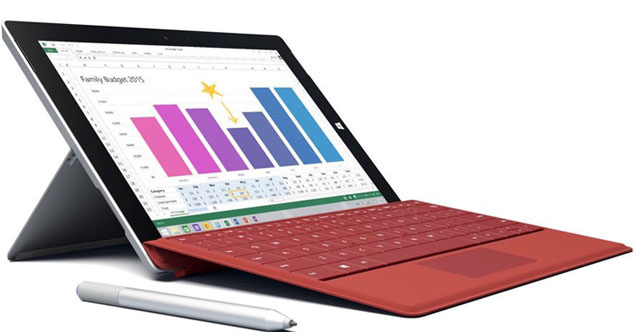
When the first- and second-generation Surface devices were launched a few years back, I got to work with some review samples in order to really put them to the test.
Although I was generally quite impressed with the hardware, I couldn’t get my head around their actual usefulness or their unique added value.
This was mainly the result of all the limitations that came with the preinstalled Windows RT operating system.
That problem was tackled successfully with the introduction of the Surface Pro 3 in 2014, but the device initially proved to be too costly.
To cut costs, Microsoft has engineered the Surface 3, which is the first non-Pro Surface device to feature a full version of the Windows 8.1 operating system.
Although Microsoft South Africa doesn’t officially sell its Surface devices on South African soil, they can still be purchased online via the Microsoft Store or at the Orange online store.
For this review, I was able to get my hands on a European press sample with 4GB RAM, a 128GB solid-state drive (SSD) and the Type Cover keyboard. This setup should sell for about R11 000 when bought through Orange.
The entry-level version of the Surface 3 has 2GB RAM and a 64GB SSD, which will be available at the Orange online store for R7 800 (at the time of writing), excluding the optional keyboard.
All versions of the Surface 3 come with a free upgrade to Windows 10, which is scheduled to be launched somewhere around August 2015. Each Surface 3 is also supplied with a one-year subscription to Office 365 Personal and includes 1TB of OneDrive cloud storage.
Look and feel: premium magnesium casing
The main difference between Surface 3 and its big brother, the Surface Pro 3, is its smaller, 10,8-inch screen with slightly lower resolution of 1 920×1 280 pixels. It is also marginally thinner because of the new processor, which doesn’t require an active cooling fan and heat dissipation vents.
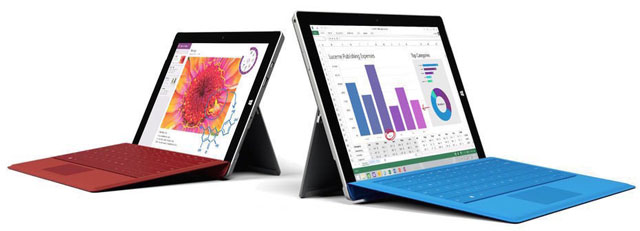
Including the optional Type Cover keyboard, the Surface 3 weighs just 902g, and without it it’s a mere 622g. This makes the device highly portable and easy to carry around, which is ideal when you plan to take it with you wherever you go. For an overview of all the other differences between the Surface 3 and 3 Pro, see here.
As with all previous Surface models, the Surface 3 features an integrated kickstand. While the one on the Surface Pro 3 can be set in any desired angle, the kickstand on the Surface 3 only has three positions to choose from. Although this may come across as a big limitation, the three pre-set angles should provide a comfortable work position nonetheless.
The unconventional 3:2 aspect ratio of the Surface 3’s touch-sensitive screen makes it a bit more square-shaped than the previous 16:9 Surface devices, which weren’t as successful as Microsoft had hoped. The Surface 3 offers the same premium look and feel as the Pro 3 model, mainly because both feature the same solid and durable magnesium exterior.
Another similarity with previous models is the lack of connectors and ports. It’s a good thing, then, that the important ones — a full-size USB 3 port and a mini DisplayPort connector — are present. The latter can be used to connect it to one external display at a maximum resolution of 4 096×2 160 pixels (4K).
 On the back of the Surface 3 is a micro SD card slot to facilitate additional storage space or easy transfer of files. The device also has a micro USB charging port that needs to be connected to the included 13W power supply for the device to start charging. This port also facilitates a conventional smartphone adapter to charge it, although that will take a lot longer to charge the battery to full.
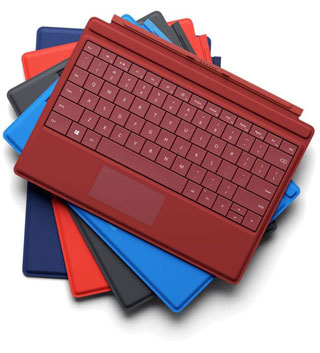
The optional Type Cover accessory can be connected to the Surface 3 by using the dock-connector that sits at the bottom of the device. It uses an efficient magnetic locking mechanism to keep the keyboard in position.
Although far from cheap (R1 500) the Surface 3 Type Cover is super thin (5mm), very light (255g), well-crafted and uses backlit keys so you can keep working in the dark even during load shedding.
On top of that, it also doubles as a screen protector. I found the keyboard to be comfortable and well equipped for typing even the longest of documents. The touchpad, on the other hand, is simply too small. I’d definitely advise getting a separate mouse if you really want to get things done.
Hardware and benchmarks: lacks horsepower
Microsoft’s Surface 3 is powered by the brand new Intel Atom x7-Z8700 processor, which in turn is based on Intel’s Cherry Trail architecture. This 14nm chip was designed to be extremely energy efficient despite housing four cores. Each core runs at a base frequency of 1,6GHz and can briefly accelerate up to 2,4GHz when necessary.
To keep the entry-level price of the Surface 3 as low as possible, Microsoft decided to fit the cheapest version of the Surface 3 with only 2GB RAM and a 64GB SSD for storage, none of which can be upgraded at a later time.
Although it might be tempting to save a bit of money, I wouldn’t recommend buying this version. Not only does Windows 8 require a minimum of 4GB RAM to run smoothly, there’s also just 36GB of free SSD space available after the operating system takes its share. Besides, I’m pretty confident that the upcoming Windows 10 operating system also wouldn’t mind 4GB of RAM instead of a measly 2GB.
To connect with the Internet and other devices wirelessly, the Surface 3 features a Marvell Avastar chip that supports all 2,4GHz and 5GHz Wi-Fi standards up to 801.11ac, as well as Bluetooth 4.0.
Although our review sample didn’t have support for 4G mobile networks, a version with 4G LTE capabilities should become available later this year.
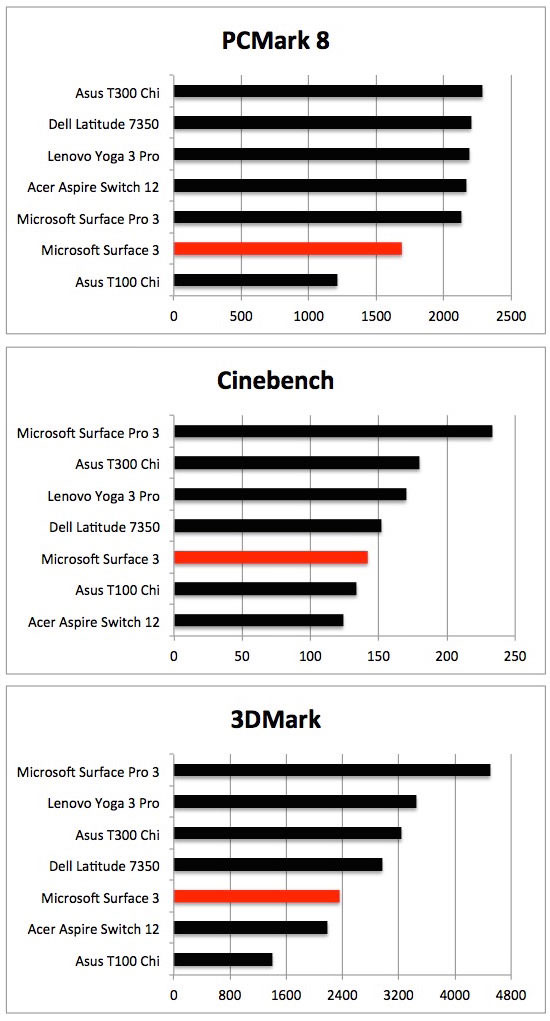
To find out how all this new hardware performed in real life, I ran a set of three different benchmarks. Test results were subsequently compared to those of similar devices. The first one, PCMark 8, includes workloads that reflect common home and office tasks such as writing documents, browsing websites, photo editing, creating spreadsheets and video calling. It showed me that the Surface 3 has serious trouble keeping up with the (more expensive) big boys that all feature higher-end, non-Atom, processors.
The second benchmark I used was Cinebench, which measures mainly the maximum performance of the CPU and uses all possible cores to do so. Again, most of the other devices proved slightly faster. The Surface Pro 3 (Intel Core i5) appeared to be the best performer, by far.
To determine how capable the Surface 3 was with handling complex (3D) graphics, I finally ran the 3DMark (Cloud Gate) benchmark. This test made it pretty obvious that the machine can’t compete with most of the other devices. It lacks a lot of the muscle that its bigger brother has in stock.
Battery life: quite good
According to Microsoft, the Surface 3 should provide up to 10 hours of battery life for video playback. To do so, it has been equipped with a 28Wh battery. All the other devices house higher capacity batteries, with the Dell Latitude 7350 (50Wh), Lenovo Yoga 3 Pro (44Wh) and Microsoft Surface Pro 3 (42Wh) topping the ranks. These devices do have slightly bigger screens, though.
To get to the bottom of the Surface 3’s actual work time on a fully charged battery, I put it through two power-drain tests. The first test continuously plays a 1080p movie until there is no energy left. The second simulates typical home and office activities such as communicating, browsing and editing documents.
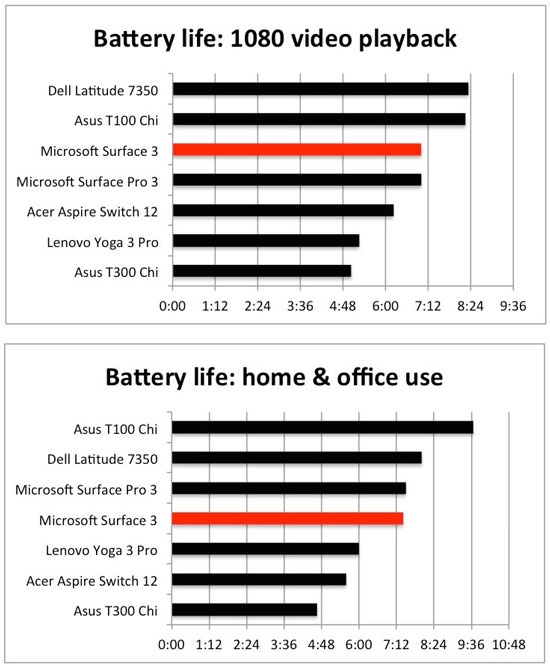
According to my initial video test, the Surface 3 device can realistically play nonstop HD video for seven hours straight, just like the Pro model. Although that’s a pretty decent score, Dell’s Latitude 7350 with its huge battery capacity and the highly energy efficient Asus T100 Chi will last even longer.
The second test shows similar satisfying results, with both Surface 3 devices holding out for almost seven hours and 30 minutes while continuously being used for typical home and office tasks. Since a typical day at home or the office also includes a lunch break and some idle time, the Surface 3 will completely run out of energy after nine hours and 25 minutes. This makes the Surface 3 very suitable to be used without a charger for a full day at home, or during business activities.
Screen: bright, with excellent colours
Microsoft’s new Surface 3 houses a 10,8-inch IPS (In Plane Switching) screen with a resolution of 1 920×1 280 pixels, all resulting in a pleasant pixel density of 214ppi.
With the third generation of Surface devices, Microsoft switched from the standard 16:9 widescreen aspect ratio to 3:2. As a result, you get extra vertical space, which becomes even more obvious when browsing or using specific office applications like Word, Outlook, PowerPoint or Excel.
Because the screen is able to display more information, there is less need to scroll up or down. The unconventional screen format does come with a major drawback, though: modern movies are formatted in 16:9, so the Surface 3 displays black bars at the bottom and top during playback.
To measure the actual screen quality, I used a specialised colorimeter to determine brightness, contrast and accuracy of colour reproduction.
Measurements indicated that the maximum brightness of its screen is top notch (at 411cd/m²) and the highest value I’ve encountered among similar devices. As a result, the Surface 3 can still be used in light-intensive situations, like direct sunlight.

Because the Surface 3 also has a built-in ambient light sensor, it adjusts screen brightness automatically to improve readability in bright situations or to reduce energy consumption in low-light offices. High brightness levels do have a disastrous effect on battery life though.
Its contrast levels of 918:1 are less spectacular, but still quite good for this category of device. The Surface Pro 3 (980:1) and Dell Latitude 7350 (1 100:1) can both display higher contrast values, resulting in more vivid and intense colours.
To finalise all screen measurements, I determined the accuracy of its colour reproduction. It seems Microsoft put in a lot of effort into getting it right. Deviations in both primary and secondary colours are so small that they can’t be detected with the naked eye. This makes the Surface 3 a great device for anyone who plans to use it for semi-professional image editing.
Conclusion
So, back to the big question: can the Surface 3 replace your notebook?
Yes it can, but only as long as you’re not wanting it for anything too demanding.
The original Surface Pro 3, which has dropped in price since its introduction, will prove to be a far better match if you’re looking for more horsepower, as well as a larger screen.
Even when compared to midrange or entry-level notebooks, the Surface 3 still falls short on aspects such as available storage space and connectors.
Its relatively high price is definitely an issue that won’t encourage masses of consumers to purchase one right away. The entry-level Surface 3 (2GB, 64GB SSD, no keyboard) already sets you back R7 800. Without the Type Cover keyboard, the Surface 3 is a mediocre tablet at best. So you’re looking at a minimum of R9 300.

To put things into perspective, the entry-level Core i3 Surface Pro 3 offers double the RAM, a faster processor, the Surface Pen, identical battery life and a bigger screen for R11 780. That’s including the keyboard.
Apart from its high price tag, the Surface 3 does offer a premium look and feel, solid and portable design, an excellent screen and good battery life. These features make it an interesting device if you plan to do a lot of travelling and want to take it with you wherever you go.
In order for the Surface 3 to become a bigger success, though, Microsoft needs to reduce its price, increase the entry-level specs or simply include the much-needed keyboard in the box. If it manages to do all three, the Surface 3 would have a much better shot replacing your notebook.
Our overall rating? 6,5 out of 10. — (c) 2015 NewsCentral Media