

Close Menu
TechCentralTechCentral

    Subscribe to the newsletter

    Get the best South African technology news and analysis delivered to your e-mail inbox every morning.

    Facebook X (Twitter) YouTube LinkedIn
    WhatsApp Facebook X (Twitter) LinkedIn YouTube
    TechCentralTechCentral
    • News
      The Post Office is out of options - Anoosh Rooplal

      The Post Office is out of options

      24 March 2026
      Namibia rejects Starlink

      Namibia rejects Starlink

      24 March 2026
      Optasia wants to do for banks what it did for telcos - Salvador Anglada

      Optasia wants to do for banks what it did for telcos

      24 March 2026
      Sanlam appoints group chief AI officer - Theo Mabaso

      Sanlam appoints group chief AI officer

      24 March 2026
      SA's digital economy is booming - but so is the fraud that comes with it - Nomvuyiso Batyi

      SA’s digital economy is booming – but so is the fraud that comes with it

      24 March 2026
    • World
      It's official: ads are coming to ChatGPT

      It’s official: ads are coming to ChatGPT

      23 March 2026
      Mystery Chinese AI model revealed to be Xiaomi's

      Mystery Chinese AI model revealed to be Xiaomi’s

      19 March 2026
      A mystery AI model has developers buzzing

      A mystery AI model has developers buzzing

      18 March 2026
      Samsung's trifold gamble ends in retreat

      Samsung’s trifold gamble ends in retreat

      17 March 2026
      Nvidia targets $1-trillion in AI chip sales as inference demand surges - Jensen Huang

      Nvidia targets $1-trillion in AI chip sales as inference demand surges

      17 March 2026
    • In-depth
      The last generation of coders

      The last generation of coders

      18 February 2026
      Sentech is in dire straits

      Sentech is in dire straits

      10 February 2026
      How liberalisation is rewiring South Africa's power sector

      How liberalisation is rewiring South Africa’s power sector

      21 January 2026
      The top-performing South African tech shares of 2025

      The top-performing South African tech shares of 2025

      12 January 2026
      Digital authoritarianism grows as African states normalise internet blackouts

      Digital authoritarianism grows as African states normalise internet blackouts

      19 December 2025
    • TCS
      Meet the CIO | HealthBridge CTO Anton Fatti on the future of digital health

      Meet the CIO | Healthbridge CTO Anton Fatti on the future of digital health

      23 March 2026
      TCS+ | Arctic Wolf unpacks the evolving threat landscape for SA businesses - Clare Loveridge and Jason Oehley

      TCS+ | Arctic Wolf unpacks the evolving threat landscape for SA businesses

      19 March 2026
      TCS+ | Vox Kiwi: a wireless solution promising a fibre-like experience - Theo van Zyl

      TCS+ | Vox Kiwi: a wireless solution promising a fibre-like experience

      13 March 2026
      TCS+ | Flipping the narrative on AI in the Global South - Josefin Rosén

      TCS+ | Flipping the narrative on AI in the Global South

      13 March 2026
      TCS | Sink or swim? Antony Makins on how AI is rewriting the rules of work

      TCS | Sink or swim? Antony Makins on how AI is rewriting the rules of work

      5 March 2026
    • Opinion
      South Africa's energy future hinges on getting wheeling right - Aishah Gire

      South Africa’s energy future hinges on getting wheeling right

      10 March 2026
      Hold the doom: the case for a South African comeback - Duncan McLeod

      Apple just dropped a bomb on the Windows world

      5 March 2026
      VC's centre of gravity is shifting - and South Africa is in the frame - Alison Collier

      VC’s centre of gravity is shifting – and South Africa is in the frame

      3 March 2026
      Hold the doom: the case for a South African comeback - Duncan McLeod

      Hold the doom: the case for a South African comeback

      26 February 2026
      The AI fraud crisis your bank is not ready for - Andries Maritz

      The AI fraud crisis your bank is not ready for

      18 February 2026
    • Company Hubs
      • 1Stream
      • Africa Data Centres
      • AfriGIS
      • Altron Digital Business
      • Altron Document Solutions
      • Altron Group
      • Arctic Wolf
      • Ascent Technology
      • AvertITD
      • Braintree
      • CallMiner
      • CambriLearn
      • CYBER1 Solutions
      • Digicloud Africa
      • Digimune
      • Domains.co.za
      • ESET
      • Euphoria Telecom
      • HOSTAFRICA
      • Incredible Business
      • iONLINE
      • IQbusiness
      • Iris Network Systems
      • LSD Open
      • Mitel
      • NEC XON
      • Netstar
      • Network Platforms
      • Next DLP
      • Ovations
      • Paracon
      • Paratus
      • Q-KON
      • SevenC
      • SkyWire
      • Solid8 Technologies
      • Telit Cinterion
      • Tenable
      • Vertiv
      • Videri Digital
      • Vodacom Business
      • Wipro
      • Workday
      • XLink
    • Sections
      • AI and machine learning
      • Banking
      • Broadcasting and Media
      • Cloud services
      • Contact centres and CX
      • Cryptocurrencies
      • Education and skills
      • Electronics and hardware
      • Energy and sustainability
      • Enterprise software
      • Financial services
      • HealthTech
      • Information security
      • Internet and connectivity
      • Internet of Things
      • Investment
      • IT services
      • Lifestyle
      • Motoring
      • Policy and regulation
      • Public sector
      • Retail and e-commerce
      • Satellite communications
      • Science
      • SMEs and start-ups
      • Social media
      • Talent and leadership
      • Telecoms
    • Events
    • Advertise
    TechCentralTechCentral
    Home » Gadgets & Reviews » Review: Durban-made Piko TV smart stick

    Review: Durban-made Piko TV smart stick

    By Nafisa Akabor21 January 2014
    Twitter LinkedIn Facebook WhatsApp Email Telegram Copy Link
    News Alerts
    WhatsApp

    Piko-640-1

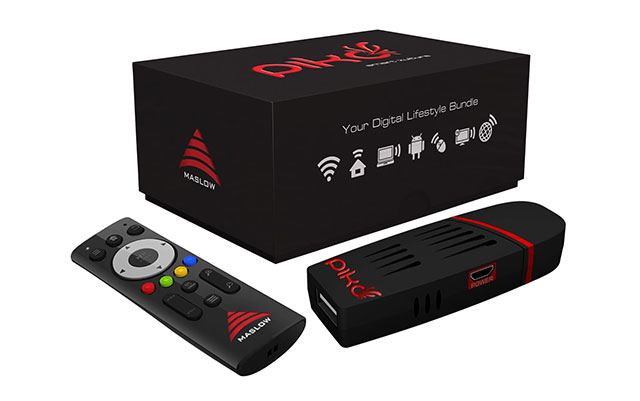
    A Durban-based company, Maslow Holdings, has developed a gizmo that promises to turn any HDMI-enabled television set into a smart TV. The R1 195 Piko “smart stick” is the size of a USB flash drive and connects to a TV through HDMI.

    The Piko smart stick, which is manufactured in Durban, runs Android 4.0 “Ice Cream Sandwich”, has 1GB of RAM, 8GB of storage (about 2GB available to users) and built-in Wi-Fi.

    Inside the box is an HDMI extender, USB power supply, four-port USB hub, USB converter, Air Mouse and receiver, USB SD/MMC/RS-MMC reader, micro SD adapter and 2x AAA batteries. All you need to use the device is a HDMI-capable TV with spare USB port.

    The Piko smart stick is a hybrid of a mini PC and tablet on a large screen, with “air mouse” (wireless point and click) controls.

    Once the Piko is plugged into a spare HDMI port and the air mouse, which comes with a USB receiver, has been connected and paired, it is ready to use.

    Anyone familiar with Android will quickly figure their way around the Piko’s software and they may only need to adjust to the idea of using an air mouse. The sensitivity of the mouse can be adjusted under settings, but the default setting works well.

    The home screen layout looks just like an Android tablet, with Google search at the top left, app drawer at the top right, and back, home and multitasking buttons on the bottom left.

    The home screen consists entirely of pre-installed apps. They include Khan Academy, Amazon Kindle, Kingsoft Office, AntiVirus, social networks such as Facebook and Twitter, and a selection of games such Angry Birds and Fruit Ninja. There’s also YouTube, SuperSport, News24, an e-mail app and Google Drive. Other options include video player, gallery, music, browser and X-Plore, a file manager.

    To get content onto the Piko, you can plug it into a PC or laptop through USB and browse the device like any other Android-based product. Users can drag and drop content onto the Piko or, alternatively, make use of the USB card reader with micro SD card adaptor and access content from another source.

    The Piko’s software runs fairly smoothly: there was no sluggishness between browsing and running multiple apps, but we did kill apps running in the background once we were done with them.

    Playing Fruit Ninja and Angry Birds with the air mouse felt like it was the first time we were playing them, mostly due to not using an air mouse before. In Fruit Ninja, it felt as if there was a one-second delay between actions, but it didn’t take away the full experience of the game.

    Using the built-in Web browser or other apps that require typing is terribly time consuming when using the air mouse, especially switching between screens of characters. However, the four-port USB hub comes in handy as you are able to plug in a keyboard to speed things up.
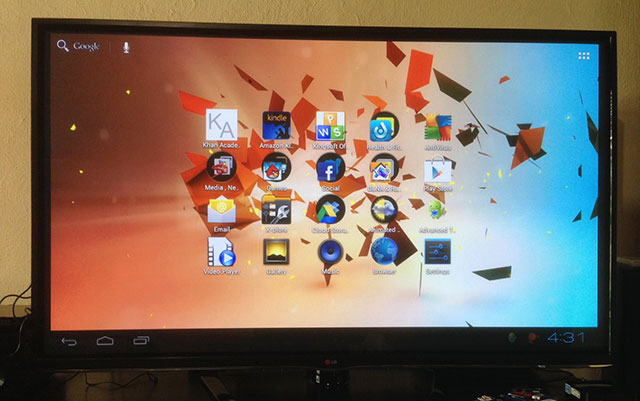
    The Piko's home screen
    The Piko’s home screen

    The Piko could find a home for those who can’t justify the cost of a full PC. It’s also a cheap solution for those who want a tablet experience — to an extent — without purchasing a tablet. But plugging in a keyboard is highly recommended.

    The Piko also appears aimed at those who are looking to watch multimedia content on an HD TV by copying files to the device or stream content to it from any device on the same network.

    We tested the live streaming feature, but had a few issues. The manual does not tell users to install the MediaHouse app for Android or a DLNA player for iOS.

    We managed to get onto an iPhone 5 from the Piko, went into our multimedia folder, but could not play any music from the tracks visible on screen, which were all free of digital rights management software.

    We also had no luck connecting the Android handset to the Piko through the streaming service. This problem could be fixed through an app update or it’s just a matter of finding another third-party DLNA player. However, we did manage to browse an Android phone — an LG G2 — after turning it into wireless storage device, and using the X-Plore file manager, but files loaded very slowly across the network.

    Nevertheless, we think the Piko would be an excellent device for schools wanting to provide access easily and cheaply to students who need to use educational apps or just access to the Internet for research. It could also be used as a learning aid in classrooms.

    While there are several really cheap Android tablets available in South Africa, none of them run Android 4.0 or have specs similar to the Piko, which also has full HD capabilities.

    The Piko smart stick is available at selected Game stores for a recommended retail price of R1 195.  — (c) 2014 NewsCentral Media

    Follow TechCentral on Google News Add TechCentral as your preferred source on Google


    Maslow Maslow Holdings Piko Piko smart stick
    WhatsApp YouTube
    Share. Facebook Twitter LinkedIn WhatsApp Telegram Email Copy Link
    Previous ArticleTelkom up on mobile rumours
    Next Article S Africans slow to adopt e-books
    Company News
    AnyDesk - high-performance remote access built for the modern enterprise

    AnyDesk – high-performance remote access built for the modern enterprise

    23 March 2026

    How South African executives can crack the AI ROI code

    20 March 2026
    Africa's first Nvidia RTX Pro GPU servers have landed

    Africa’s first Nvidia RTX Pro GPU servers have landed

    19 March 2026
    Opinion
    South Africa's energy future hinges on getting wheeling right - Aishah Gire

    South Africa’s energy future hinges on getting wheeling right

    10 March 2026
    Hold the doom: the case for a South African comeback - Duncan McLeod

    Apple just dropped a bomb on the Windows world

    5 March 2026
    VC's centre of gravity is shifting - and South Africa is in the frame - Alison Collier

    VC’s centre of gravity is shifting – and South Africa is in the frame

    3 March 2026

    Subscribe to Updates

    Get the best South African technology news and analysis delivered to your e-mail inbox every morning.

    Latest Posts
    The Post Office is out of options - Anoosh Rooplal

    The Post Office is out of options

    24 March 2026
    Namibia rejects Starlink

    Namibia rejects Starlink

    24 March 2026
    Optasia wants to do for banks what it did for telcos - Salvador Anglada

    Optasia wants to do for banks what it did for telcos

    24 March 2026
    Sanlam appoints group chief AI officer - Theo Mabaso

    Sanlam appoints group chief AI officer

    24 March 2026
    © 2009 - 2026 NewsCentral Media
    • Cookie policy (ZA)
    • TechCentral – privacy and Popia

    Type above and press Enter to search. Press Esc to cancel.

    Manage consent

    TechCentral uses cookies to enhance its offerings. Consenting to these technologies allows us to serve you better. Not consenting or withdrawing consent may adversely affect certain features and functions of the website.

    Functional Always active
    The technical storage or access is strictly necessary for the legitimate purpose of enabling the use of a specific service explicitly requested by the subscriber or user, or for the sole purpose of carrying out the transmission of a communication over an electronic communications network.
    Preferences
    The technical storage or access is necessary for the legitimate purpose of storing preferences that are not requested by the subscriber or user.
    Statistics
    The technical storage or access that is used exclusively for statistical purposes. The technical storage or access that is used exclusively for anonymous statistical purposes. Without a subpoena, voluntary compliance on the part of your Internet Service Provider, or additional records from a third party, information stored or retrieved for this purpose alone cannot usually be used to identify you.
    Marketing
    The technical storage or access is required to create user profiles to send advertising, or to track the user on a website or across several websites for similar marketing purposes.
    • Manage options
    • Manage services
    • Manage {vendor_count} vendors
    • Read more about these purposes
    View preferences
    • {title}
    • {title}
    • {title}