Close Menu
TechCentralTechCentral

    Subscribe to the newsletter

    Get the best South African technology news and analysis delivered to your e-mail inbox every morning.

    Facebook X (Twitter) YouTube LinkedIn
    WhatsApp Facebook X (Twitter) LinkedIn YouTube
    TechCentralTechCentral
    • News
      Another windfall for Datatec shareholders - Jens Montanana

      Another windfall for Datatec shareholders

      19 June 2026
      WhatsApp starts charging South Africans - for the extras

      WhatsApp starts charging South Africans – for the extras

      19 June 2026
      AI agents are coming to your Visa card

      AI agents are coming to your Visa card

      19 June 2026
      Naspers signals core earnings surge ahead of results

      Naspers signals core earnings surge ahead of results

      19 June 2026
      Home affairs bookings get a security overhaul

      Home affairs bookings get a security overhaul

      19 June 2026
    • World
      Google on the hook for what its AI tells users, court rules

      Google on the hook for what its AI tells users, court rules

      15 June 2026
      How Russians juggle VPNs to outwit the Kremlin

      How Russians juggle VPNs to outwit the Kremlin

      15 June 2026
      Amazon CEO flagged Anthropic AI risks to Washington - Andy Jassy

      Amazon CEO flagged Anthropic AI risks to Washington

      14 June 2026
      Trouble at Xbox

      Trouble at Xbox

      11 June 2026
      Meta declares war on Israeli spyware firm

      Meta declares war on Israeli spyware firm

      8 June 2026
    • In-depth
      AI boom sparks rally, frenzy and fear

      AI boom sparks rally, frenzy and fear

      11 June 2026
      Every plug-in hybrid on sale in South Africa, ranked by price - Lamborghini Temerario

      Every plug-in hybrid on sale in South Africa, ranked by price

      7 June 2026
      What Wi-Fi 8 will mean for wireless networks

      What Wi-Fi 8 will mean for wireless networks

      1 June 2026
      Alfa's electric rebel - Alfa Romeo Junior Elettrica Veloce

      Alfa’s electric rebel

      29 April 2026
      Africa switches on as Europe dims the lights

      Africa switches on as Europe dims the lights

      9 April 2026
    • TCS
      Watts & Wheels S1E6: 'A flawless Alfa and a bakkie that divides'

      Watts & Wheels S1E6: ‘A flawless Alfa and a bakkie that divides’

      17 June 2026
      Watts & Wheels S1E6: 'A flawless Alfa and a bakkie that divides'

      Watts & Wheels S1E5: ‘A Bentley of the bush and a car that swims’

      8 June 2026
      TCS | Charge's R1.8-billion bet on an off-grid EV future - Charge chairman Joubert Roux

      TCS | Charge’s R1.8-billion bet on an off-grid EV future

      18 May 2026
      TCS+ | The Up&Up Group on the hidden cost of AI - Jason Harrison

      TCS+ | The Up&Up Group on the hidden cost of AI

      13 May 2026
      Michael Rossouw

      TCS+ | The retirement decision most South Africans get wrong

      6 May 2026
    • Opinion
      Finish the job Mandela started - Farzam Ehsani

      Finish the job Mandela started

      18 June 2026
      The author, Fanie van Rooyen

      The US just showed it can switch off our AI

      17 June 2026
      The clock is ticking on South African banks' biggest advantage - Pambos Soteriades

      The clock is ticking on South African banks’ biggest advantage

      9 June 2026

      Clashing judgments leave South Africa’s crypto law unsettled

      2 June 2026
      The clock is ticking on South African banks' biggest advantage - Pambos Soteriades

      The trap inside South Africa’s banking MVNO boom

      1 June 2026
    • Company Hubs
      • 1Stream
      • Africa Data Centres
      • AfriGIS
      • Altron Digital Business
      • Altron Document Solutions
      • Altron Group
      • Arctic Wolf
      • Ascent Technology
      • AvertITD
      • BBD
      • Braintree
      • CallMiner
      • CambriLearn
      • CM Telecom
      • Contactable
      • CYBER1 Solutions
      • Digicloud Africa
      • Digimune
      • Domains.co.za
      • ESET
      • Euphoria Telecom
      • HOSTAFRICA
      • Incredible Business
      • iONLINE
      • IQbusiness
      • Iris Network Systems
      • Kaspersky
      • LSD Open
      • Mitel
      • NEC XON
      • Netstar
      • Network Platforms
      • Next DLP
      • Ovations
      • Paracon
      • Paratus
      • Q-KON
      • SevenC
      • SkyWire
      • Solid8 Technologies
      • Telit Cinterion
      • Telviva
      • Tenable
      • Vertiv
      • Videri Digital
      • Vodacom Business
      • Wipro
      • Workday
      • XLink
    • Sections
      • AI and machine learning
      • Banking
      • Broadcasting and Media
      • Cloud services
      • Contact centres and CX
      • Cryptocurrencies
      • Education and skills
      • Electronics and hardware
      • Energy and sustainability
      • Enterprise software
      • Financial services
      • HealthTech
      • Information security
      • Internet and connectivity
      • Internet of Things
      • Investment
      • IT services
      • Lifestyle
      • Motoring
      • Policy and regulation
      • Public sector
      • Retail and e-commerce
      • Satellite communications
      • Science
      • SMEs and start-ups
      • Social media
      • Talent and leadership
      • Telecoms
    • Events
    • Advertise
    TechCentralTechCentral
    Home » Gadgets & Reviews » Vodacom’s Linkbook Linux netbook reviewed

    Vodacom’s Linkbook Linux netbook reviewed

    By Editor13 May 2010
    Twitter LinkedIn Facebook WhatsApp Email Telegram Copy Link
    News Alerts
    WhatsApp

    For years, Nicholas Negroponte, chairman emeritus of the Massachusetts Institute of Technology’s Media Lab, punted the idea of a US$100 laptop.

    His idea was that a low-cost machine, ruggedised for conditions in the developing world, would transform education in poorer countries by putting computing and information in the hands of millions of children for the first time.

    The project, which has morphed over the years into the XO-1, never took off to the extent Negroponte had hoped. And the price of the $100 laptop has remained stubbornly above that level.

    But the cost of notebook computers — and especially the low-cost netbook category of notebooks — has continued to plummet.

    Now, SA entrepreneurs Mark Levy and Neil Watson have developed a netbook they hope is going to put computing — and the Internet — in the hands of people who couldn’t previously afford it.

    They’ve partnered with Vodacom to provide their machine, called the Linkbook, for R199/month. That price, which requires a 24-month contract, includes 300MB/month of data from Vodacom. Levy says the Linkbook, which is already on sale through Vodacom outlets, is garnering significant interest from consumers.

    But is the Linkbook any good? TechCentral has spent the past two days using the machine and our initial thoughts are fairly mixed.

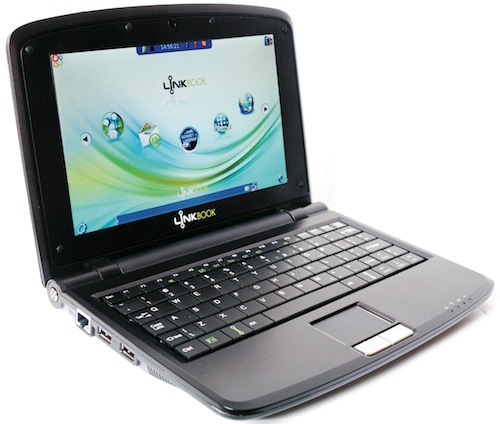
    To keep costs down, the machine doesn’t come with Windows preinstalled. Instead, it runs a highly customised version of the K Desktop Environment running on top of the Ubuntu Linux desktop. The Linkbook designers call it Link OS.

    Link OS’s design is minimalistic, meant to take full advantage of the relatively small 8,9-inch TFT display.

    Each corner of the display features an icon, which provides access to a range of applications and services. Click on any of the four icons, and the applications available to users — presented in the form of a “ribbon” of icons in the middle of the screen — changes.

    The four icons bring up applications related to OpenOffice.org (the free Microsoft Office alternative); entertainment (music and movie players); Internet (Web browser, e-mail and the like); and computer settings.

    There’s a task tray at the bottom of the screen, which includes information about your 3G or Wi-Fi connection, as well as open applications. At the top of the screen is an information bar, which includes the time, a volume controller, battery indicator and a power-down button.

    Other than OpenOffice, software that comes preinstalled includes the XMMS media player (we’d really have preferred VLC), Pidgin for instant messaging, Sylpheed for e-mail (Thunderbird would have been better) and a Web browser based on Firefox. There is also a bunch of educational games, which is a nice touch.

    The machine has no hard drive; instead it uses 16GB of flash memory. That doesn’t sound like much, but it’s fine if all you’re going to use the machine for is to browse the Web, check your e-mail, play the games it comes with and produce the occasional document.

    The Linkbook is powered by a Motorola PowerPC processor that seems up to the task of running the applications that ship with the device. It also has 256MB of RAM. Be warned that Flash won’t run on the PowerPC processor, so you won’t be able to watch videos on YouTube or view any other Flash-based websites. Skype also won’t run.

    There are two USB ports, an Ethernet port, a VGA adapter for hooking the machine up to an external monitor or projector, SD/MMC card slot, and headphone and microphone jacks. Sound through the built-in speaker is tinny but doesn’t distort at high volume.

    The keyboard is a little cramped — it’s not a full-size Qwerty — and touch-typists could find it difficult to use. But then the machine is aimed mainly at first-time computer buyers, who’ll tend to be two-finger typists.

    Another problem we found was that the trackpad was a little unresponsive. You really have to press it fairly hard before you can get the mouse pointer to move.

    The Wi-Fi antenna, located on the right-hand side of the screen, runs a little hot, too, though the base of the machine remains cool. Your lap will thank you for that.

    As far the software goes, the developers have done a good job of simplifying the Linux experience and making the Linkbook relatively trivial to use. There are some niggles, though. There are a few spelling and grammatical errors in some of the dialogue boxes, for example. What does “You need to determine that you have insert the SIM card” mean exactly? And the update software doesn’t work — it throws up a cryptic message that an average user will simply not fathom.

    On the plus side, connecting to Vodacom’s network was a snap — we had no problems, though the Link 3G software used to dial up is a little rudimentary.

    However, if you want to do more than the most basic Web browsing and e-mail on the Linkbook, you’re going to need some experience in Linux. Unfortunately, getting into the guts of the operating system is not easy — there’s no obvious way to get to a text-based command line. We’re told it is possible, though.

    Also, the version of Ubuntu used on Linkbook looks fairly old — as far as we can tell, it’s running Hardy Heron, which was released more than two years ago. If you’re not going to be able to run the update software — and we couldn’t — then you may be vulnerable to security flaws in the software.

    Lastly, the battery life is dreadful. A fully juiced battery will last only about two hours with Wi-Fi and 3G switched off; with wireless on, the machine will give you about 90 minutes before it has to be reconnected to the grid. That’s pretty poor compared to other, modern netbooks.

    For the price, though, it’s difficult to be too hard on the Linkbook. At R199/month, it is becoming easier to get computing into the hands of almost everyone. We’re sure that Nicholas Negroponte would agree with us that that’s a good thing. But whether this is the device to do it is open to debate.  — Duncan McLeod, TechCentral

    • Subscribe to our free daily newsletter
    • Follow us on Twitter or on Facebook

    Follow TechCentral on Google News Add TechCentral as your preferred source on Google


    Linkbook Mark Levy Neil Watson Ubuntu Ubuntu Linux Vodacom
    WhatsApp YouTube
    Share. Facebook Twitter LinkedIn WhatsApp Telegram Email Copy Link
    Previous ArticleUnease over Telkom’s World Cup investment
    Next Article Alan Wake: light entertainment

    Related Posts

    The millions Vodacom spends protecting its CEO - Shameel Joosub

    The millions Vodacom spends protecting its CEO

    14 June 2026
    The missing number in Vodacom's annual report - Nkosana Makate please call me

    The missing number in Vodacom’s annual report

    12 June 2026
    MTN Group goes all-in on platforms and AI - Ralph Mupita

    MTN Group goes all-in on platforms and AI

    10 June 2026
    Company News
    Moving past the pilot: inside the CloudZA and AWS closed-door AI executive roundtable

    CloudZA and AWS chart the road from AI pilots to production

    19 June 2026
    The role of edge infrastructure in South Africa's AI leap - OADC Open Access Data Centres

    The role of edge infrastructure in South Africa’s AI leap

    19 June 2026
    BBD's new FinOps white paper: your road map to kill cloud waste

    BBD’s new FinOps white paper: your road map to kill cloud waste

    19 June 2026
    Opinion
    Finish the job Mandela started - Farzam Ehsani

    Finish the job Mandela started

    18 June 2026
    The author, Fanie van Rooyen

    The US just showed it can switch off our AI

    17 June 2026
    The clock is ticking on South African banks' biggest advantage - Pambos Soteriades

    The clock is ticking on South African banks’ biggest advantage

    9 June 2026

    Subscribe to Updates

    Get the best South African technology news and analysis delivered to your e-mail inbox every morning.

    Latest Posts
    Another windfall for Datatec shareholders - Jens Montanana

    Another windfall for Datatec shareholders

    19 June 2026
    WhatsApp starts charging South Africans - for the extras

    WhatsApp starts charging South Africans – for the extras

    19 June 2026
    AI agents are coming to your Visa card

    AI agents are coming to your Visa card

    19 June 2026
    Naspers signals core earnings surge ahead of results

    Naspers signals core earnings surge ahead of results

    19 June 2026
    © 2009 - 2026 NewsCentral Media
    • Cookie policy (ZA)
    • TechCentral – privacy and Popia

    Type above and press Enter to search. Press Esc to cancel.

    Manage consent

    TechCentral uses cookies to enhance its offerings. Consenting to these technologies allows us to serve you better. Not consenting or withdrawing consent may adversely affect certain features and functions of the website.

    Functional Always active
    The technical storage or access is strictly necessary for the legitimate purpose of enabling the use of a specific service explicitly requested by the subscriber or user, or for the sole purpose of carrying out the transmission of a communication over an electronic communications network.
    Preferences
    The technical storage or access is necessary for the legitimate purpose of storing preferences that are not requested by the subscriber or user.
    Statistics
    The technical storage or access that is used exclusively for statistical purposes. The technical storage or access that is used exclusively for anonymous statistical purposes. Without a subpoena, voluntary compliance on the part of your Internet Service Provider, or additional records from a third party, information stored or retrieved for this purpose alone cannot usually be used to identify you.
    Marketing
    The technical storage or access is required to create user profiles to send advertising, or to track the user on a website or across several websites for similar marketing purposes.
    • Manage options
    • Manage services
    • Manage {vendor_count} vendors
    • Read more about these purposes
    View preferences
    • {title}
    • {title}
    • {title}