
Close Menu
TechCentralTechCentral

    Subscribe to the newsletter

    Get the best South African technology news and analysis delivered to your e-mail inbox every morning.

    Facebook X (Twitter) YouTube LinkedIn
    WhatsApp Facebook X (Twitter) LinkedIn YouTube
    TechCentralTechCentral
    • News
      Vuyani Jarana: Mobile coverage masks a deeper broadband failure

      Vuyani Jarana: Mobile coverage masks a deeper broadband failure

      30 January 2026
      SABC Plus to flight Microsoft AI training videos

      SABC Plus to flight Microsoft AI training videos

      30 January 2026
      Fibre ducts

      Fibre industry consolidation in KZN

      30 January 2026
      Watts & Wheels S1E3: 'BYD's Corolla Cross challenger'

      Watts & Wheels S1E3: ‘BYD’s Corolla Cross challenger’

      30 January 2026
      What ordinary South Africans really think of AI

      What ordinary South Africans really think of AI

      30 January 2026
    • World
      Apple acquires audio AI start-up Q.ai

      Apple acquires audio AI start-up Q.ai

      30 January 2026
      SpaceX IPO may be largest in history

      SpaceX IPO may be largest in history

      28 January 2026
      Nvidia throws AI at the weather

      Nvidia throws AI at weather forecasting

      27 January 2026
      Debate erupts over value of in-flight Wi-Fi

      Debate erupts over value of in-flight Wi-Fi

      26 January 2026
      Intel takes another hit - Intel CEO Lip-Bu Tan. Laure Andrillon/Reuters

      Intel takes another hit

      23 January 2026
    • In-depth
      How liberalisation is rewiring South Africa's power sector

      How liberalisation is rewiring South Africa’s power sector

      21 January 2026
      The top-performing South African tech shares of 2025

      The top-performing South African tech shares of 2025

      12 January 2026
      Digital authoritarianism grows as African states normalise internet blackouts

      Digital authoritarianism grows as African states normalise internet blackouts

      19 December 2025
      TechCentral's South African Newsmakers of 2025

      TechCentral’s South African Newsmakers of 2025

      18 December 2025
      Black Friday goes digital in South Africa as online spending surges to record high

      Black Friday goes digital in South Africa as online spending surges to record high

      4 December 2025
    • TCS
      TCS+ | How Cloud On Demand is helping SA businesses succeed in the cloud - Xhenia Rhode, Dion Kalicharan

      TCS+ | Cloud On Demand and Consnet: inside a real-world AWS partner success story

      30 January 2026
      Watts & Wheels S1E3: 'BYD's Corolla Cross challenger'

      Watts & Wheels S1E2: ‘China attacks, BMW digs in, Toyota’s sublime supercar’

      23 January 2026

      TCS+ | Why cybersecurity is becoming a competitive advantage for SA businesses

      20 January 2026
      Watts & Wheels S1E3: 'BYD's Corolla Cross challenger'

      Watts & Wheels: S1E1 – ‘William, Prince of Wheels’

      8 January 2026
      TCS+ | Africa's digital transformation - unlocking AI through cloud and culture - Cliff de Wit Accelera Digital Group

      TCS+ | Cloud without culture won’t deliver AI: Accelera’s Cliff de Wit

      12 December 2025
    • Opinion
      South Africa's skills advantage is being overlooked at home - Richard Firth

      South Africa’s skills advantage is being overlooked at home

      29 January 2026
      Why Elon Musk's Starlink is a 'hard no' for me - Songezo Zibi

      Why Elon Musk’s Starlink is a ‘hard no’ for me

      26 January 2026
      South Africa's new fibre broadband battle - Duncan McLeod

      South Africa’s new fibre broadband battle

      20 January 2026
      AI moves from pilots to production in South African companies - Nazia Pillay SAP

      AI moves from pilots to production in South African companies

      20 January 2026
      South Africa's new fibre broadband battle - Duncan McLeod

      ANC’s attack on Solly Malatsi shows how BEE dogma trumps economic reality

      14 December 2025
    • Company Hubs
      • Africa Data Centres
      • AfriGIS
      • Altron Digital Business
      • Altron Document Solutions
      • Altron Group
      • Arctic Wolf
      • AvertITD
      • Braintree
      • CallMiner
      • CambriLearn
      • CYBER1 Solutions
      • Digicloud Africa
      • Digimune
      • Domains.co.za
      • ESET
      • Euphoria Telecom
      • Incredible Business
      • iONLINE
      • IQbusiness
      • Iris Network Systems
      • LSD Open
      • NEC XON
      • Netstar
      • Network Platforms
      • Next DLP
      • Ovations
      • Paracon
      • Paratus
      • Q-KON
      • SevenC
      • SkyWire
      • Solid8 Technologies
      • Telit Cinterion
      • Tenable
      • Vertiv
      • Videri Digital
      • Vodacom Business
      • Wipro
      • Workday
      • XLink
    • Sections
      • AI and machine learning
      • Banking
      • Broadcasting and Media
      • Cloud services
      • Contact centres and CX
      • Cryptocurrencies
      • Education and skills
      • Electronics and hardware
      • Energy and sustainability
      • Enterprise software
      • Financial services
      • Information security
      • Internet and connectivity
      • Internet of Things
      • Investment
      • IT services
      • Lifestyle
      • Motoring
      • Public sector
      • Retail and e-commerce
      • Satellite communications
      • Science
      • SMEs and start-ups
      • Social media
      • Talent and leadership
      • Telecoms
    • Events
    • Advertise
    TechCentralTechCentral
    Home » Gadgets & Reviews » Is this the world’s best Windows laptop?

    Is this the world’s best Windows laptop?

    By Duncan McLeod11 March 2014
    Twitter LinkedIn Facebook WhatsApp Email Telegram Copy Link
    News Alerts
    WhatsApp

    ThinkPad-X1-Carbon-Touch-2014-640-1

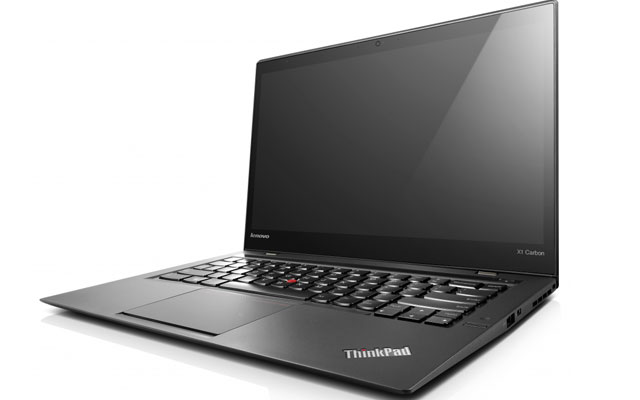
    The ThinkPad line has always been synonymous with great build quality. Lenovo, which bought the brand from IBM with its acquisition of Big Blue’s PC business in 2005, has built on that reputation, especially with the X1 Carbon line of ultraportable and professional-grade PCs.

    With the latest, the 2014 edition of the ThinkPad X1 Carbon and Carbon Touch line-up, Lenovo has taken an already very good product and made it even better — for the most part.

    Taking the X1 Carbon — we reviewed the 1,4kg touch-screen version — out of its box reveals little immediately that is much different to the previous generation. Encased in a gorgeous black plastic shell, the machine remains lightweight and super thin and, while not as portable as the MacBook Air, packs in a lot more hardware punch than the Apple ultraportable.

    This is undoubtedly a machine for well-heeled professionals who demand a powerful Windows laptop that is also sleek and supremely portable.

    Flipping the X1 Carbon’s lid open it’s immediately clear this is no minor upgrade. The most notable change — and biggest improvement — is the new, high-resolution screen that falls into “Retina” territory, to borrow Apple’s term for its high-definition displays.

    The increase in resolution, from last year’s model’s 1 600×900 pixels to a stunning 2 560×1 440 pixels makes the 14-inch display almost sparkle, even though it’s matte (on both the touch and non-touch versions). Anyone who has used a Retina MacBook Pro will know the impact the resolution boost has: fonts, in particular, are noticeably sharper. Reading the Web or documents is a pleasure.

    However, we were surprised to find that not all applications support the hi-res display, most notably Google’s Chrome Web browser, which rendered text in a distinctly pixellated and low-resolution way. Apparently, it is possible to hack some settings to get Chrome to display correctly, but we simply switched to using the equally capable Firefox instead.

    Battery life is noticeably better, too, though capacity remains at the 2013 model’s 45Wh. But we managed at least an hour more on average than the three or four hours we eked out of the 2013 model, probably thanks in large part to the fact that it packs a low-power Intel “Haswell” processor.

    The 2013 non-touch version got up to an extra hour of juice, so, unless you spend a lot of time in Windows 8’s tile-based “Metro” interface, we’d advise steering clear of the touch model. Business users are likely to spend most of their time using Windows in its traditional desktop mode anyway and the extra battery life will prove much more useful.

    Other big changes have been made to the new X1 Carbon, most of them positive, but there have been one of two design decisions that make no sense at all — and will serve to infuriate those upgrading from the older model.

    The good stuff
    But first, the good stuff. Lenovo has rejigged the placement of parts completely. The Core i7-4550U processor (the version in our review model) has been moved to the right, rather than being located next to the power port on the left. Most of the time, it doesn’t run nearly as hot as the processor in the previous generation X1, which, as users of the older model will attest, can get warm enough to become uncomfortable on a bare leg. But put the hardware through its paces by firing up a high-end game and things get quite toasty. Of course, this machine isn’t aimed at users requiring resource-intensive applications like games or those wanting to edit hours of high-definition video.

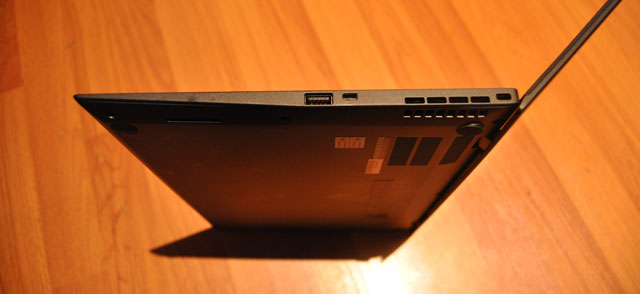
    The left-side of the machine houses the power socket and docking station port (new to this model), 3,5mm audio jack, a full-sized HDMI port and DisplayPort and a USB 3 port. To the right, alongside the processor’s cooling vents, are a proprietary gigabit Ethernet port (a dongle is included in the box), another USB 3 port and a Kensington Security Slot.

    The Kensington lock is important in a machine this pricey. In fact, security is clearly one of Lenovo’s main focus areas with the new X1, which includes hardened Bios security settings, hard drive encryption, Intel’s Anti-Theft/Computrace technology, a fingerprint scanner and integrated cryptoprocessing technology.
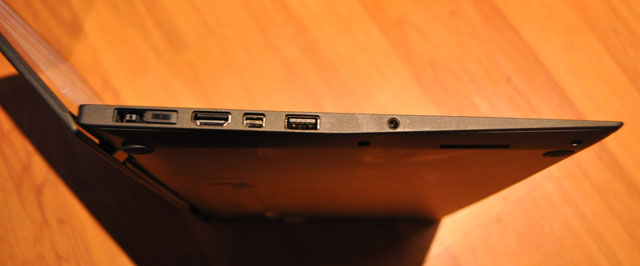
    Left-hand side of the new ThinkPad X1 Carbon Touch
    Left-hand side of the new ThinkPad X1 Carbon Touch
    Left-hand side of the new ThinkPad X1 Carbon Touch
    Right-hand side of the new ThinkPad X1 Carbon Touch

    On the back is a Sim card slot, which allows mobile connections of up to 42Mbit/s over evolved high-speed packet access networks. The Wi-Fi module includes the snappy new “ac” standard.

    The most controversial aspects of the new X1 Carbon involve changes made to the keyboard, which has had a radical overhaul over previous models — and the amendments are not all for the better.

    Bizarrely, Lenovo has moved the “Delete” key to where the “Backspace” key used to be. “Backspace” has shifted one key space to the left. The predictable result: we’d constantly hit the “Delete” key when meaning to hit “Backspace”. Even after days of using the machine, we still couldn’t get it right. It’s an infuriating design flaw.

    Another odd decision is replacing the “Caps Lock”, above the left “Shift” button, with dual “Home” and “End” buttons. To switch on caps lock, one now has to double-tap “Shift”. We often found we’d enabled caps lock by mistake. It’s not as bad as the “Backspace” issue, but it’s still a poor design decision in our view.

    Thankfully, the problems with the keyboard end there. Lenovo has kept the Chiclet-style keys, which remain comfortable and firm under the fingers. Touch-typing is a pleasure. Also unchanged is the familiar red “pointing stick” found on other ThinkPad models. Some users swear by it — we certainly do — but those who prefer a touchpad will find the one on the new X1 more than up to the job.

    Another controversial design decision — but one which we think actually works — is that Lenovo has removed the traditional Windows function keys, replacing them with a touch-sensitive panel above the number keys. Pressing the “Fn” soft-button at the left of the panel cycles between five available panel options (among them a browser mode and a conference mode), with a wide range of settings on offer.

    There’s a soft-button to bring up an applications list, for example, and another to cycle through open apps. There’s even one to enable aeroplane mode. We particularly liked the search button, which calls up Windows 8’s search centre. Unfortunately, the icons cannot be changed.

    We also liked a new camera gestures mode that make use of the integrated camera to control applications. In a music player, for example, holding up an index finger to your lips mutes playback while swiping to the left skips to the next track. It can also be used in PowerPoint to flip between slides or in a PDF reader to flip between the pages of a book.
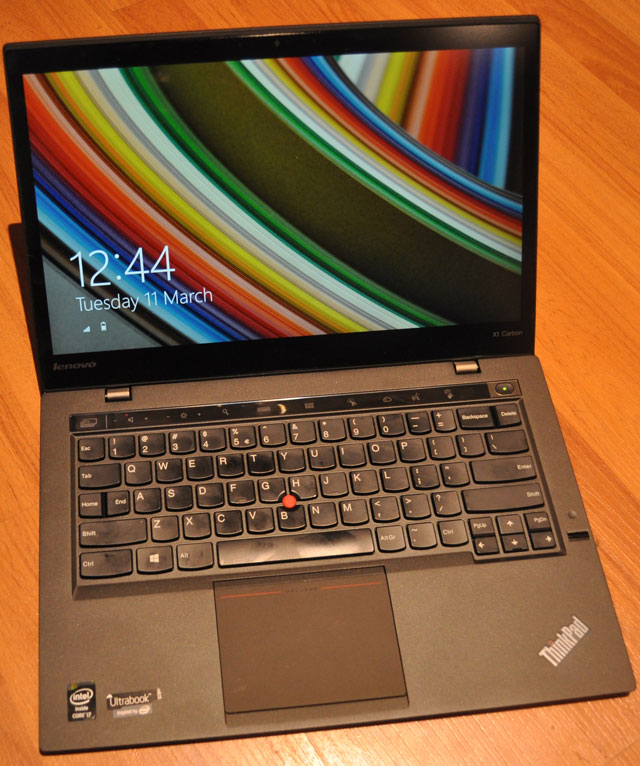
    Sleek and ultraportable
    Sleek and ultraportable

    There’s an option, too, to drive the X1 using your voice. But for the life of us we couldn’t get it to work. It didn’t support South African English and changing to UK English didn’t help either. Documentation suggests it may simply not be available at all in certain regions, including South Africa.

    Hefty price
    All in all, Lenovo has delivered a solid upgrade to what was already a very good Windows ultraportable. Even if you already have the last model, the company has probably done enough to warrant an upgrade, particularly with that wonderful, high-density display.

    The improved (but still not stellar) battery may convince some buyers, while others will be attracted to the fact that it finally supports docking stations.

    The X1 Carbon Touch — our review model was supplied by technology distributor Mustek — has a recommended retail price of R32 799 including VAT. That includes a 256GB Samsung solid-state drive and 8GB of RAM.

    If you’re in the market for a business-focused Windows ultraportable (and for practical or ideological reasons the Retina-based MacBook Pro is not an alternative), then the new ThinkPad X1 Carbon (or the Touch) should probably be near if not at the very top of your list of options.  — (c) 2014 NewsCentral Media



    Lenovo Mustek ThinkPad ThinkPad X1 Carbon ThinkPad X1 Carbon review ThinkPad X1 Carbon Touch ThinkPad X1 Carbon Touch review
    WhatsApp YouTube Follow on Google News Add as preferred source on Google
    Share. Facebook Twitter LinkedIn WhatsApp Telegram Email Copy Link
    Previous ArticleSKA gets R1,7bn British injection
    Next Article No e-tolls for W Cape roads

    Related Posts

    AI is eating the world's memory - and we're all going to pay the price

    AI is eating the world’s memory – and we’re all going to pay the price

    22 January 2026
    The era of (relatively) cheap computers is over

    The era of (relatively) cheap computers is over

    13 January 2026
    Novus to appeal after being told to hike Mustek bid

    Novus to appeal after being told to hike Mustek bid

    5 January 2026
    Company News
    Huawei turns 25 in South Africa, celebrates with major device discounts

    Huawei turns 25 in South Africa, celebrates with major device discounts

    30 January 2026
    Phishing has not disappeared, but it has grown up - KnowBe4

    Phishing has not disappeared, but it has grown up

    30 January 2026
    Smartphone affordability: South Africa's new economic divide - PayJoy

    Smartphone affordability: South Africa’s new economic divide

    29 January 2026
    Opinion
    South Africa's skills advantage is being overlooked at home - Richard Firth

    South Africa’s skills advantage is being overlooked at home

    29 January 2026
    Why Elon Musk's Starlink is a 'hard no' for me - Songezo Zibi

    Why Elon Musk’s Starlink is a ‘hard no’ for me

    26 January 2026
    South Africa's new fibre broadband battle - Duncan McLeod

    South Africa’s new fibre broadband battle

    20 January 2026

    Subscribe to Updates

    Get the best South African technology news and analysis delivered to your e-mail inbox every morning.

    Latest Posts
    Vuyani Jarana: Mobile coverage masks a deeper broadband failure

    Vuyani Jarana: Mobile coverage masks a deeper broadband failure

    30 January 2026
    TCS+ | How Cloud On Demand is helping SA businesses succeed in the cloud - Xhenia Rhode, Dion Kalicharan

    TCS+ | Cloud On Demand and Consnet: inside a real-world AWS partner success story

    30 January 2026
    Huawei turns 25 in South Africa, celebrates with major device discounts

    Huawei turns 25 in South Africa, celebrates with major device discounts

    30 January 2026
    SABC Plus to flight Microsoft AI training videos

    SABC Plus to flight Microsoft AI training videos

    30 January 2026
    © 2009 - 2026 NewsCentral Media
    • Cookie policy (ZA)
    • TechCentral – privacy and Popia

    Type above and press Enter to search. Press Esc to cancel.

    Manage consent

    TechCentral uses cookies to enhance its offerings. Consenting to these technologies allows us to serve you better. Not consenting or withdrawing consent may adversely affect certain features and functions of the website.

    Functional Always active
    The technical storage or access is strictly necessary for the legitimate purpose of enabling the use of a specific service explicitly requested by the subscriber or user, or for the sole purpose of carrying out the transmission of a communication over an electronic communications network.
    Preferences
    The technical storage or access is necessary for the legitimate purpose of storing preferences that are not requested by the subscriber or user.
    Statistics
    The technical storage or access that is used exclusively for statistical purposes. The technical storage or access that is used exclusively for anonymous statistical purposes. Without a subpoena, voluntary compliance on the part of your Internet Service Provider, or additional records from a third party, information stored or retrieved for this purpose alone cannot usually be used to identify you.
    Marketing
    The technical storage or access is required to create user profiles to send advertising, or to track the user on a website or across several websites for similar marketing purposes.
    • Manage options
    • Manage services
    • Manage {vendor_count} vendors
    • Read more about these purposes
    View preferences
    • {title}
    • {title}
    • {title}