Close Menu
TechCentralTechCentral

    Subscribe to the newsletter

    Get the best South African technology news and analysis delivered to your e-mail inbox every morning.

    Facebook X (Twitter) YouTube LinkedIn
    WhatsApp Facebook X (Twitter) LinkedIn YouTube
    TechCentralTechCentral
    • News
      South Africa is sleepwalking into another AI policy failure - Celeste Labuschagne

      South Africa is sleepwalking into another AI policy failure

      20 May 2026
      Eskom to go to market for 5.2GW of new nuclear within a year

      Eskom to go to market for 5.2GW of new nuclear within a year

      20 May 2026
      The Mythos hacking threat is looking overblown

      The Mythos hacking threat is looking overblown

      20 May 2026
      Inflation spikes higher - and the worst is still to come

      Inflation spikes higher – and the worst is still to come

      20 May 2026
      MTN to work with police to fight E Cape base station crime - Charles Molapisi MTN South Africa CEO

      MTN to turn its African towers into an AI inference grid

      20 May 2026
    • World
      Vatican confronts the age of artificial intelligence. Edgar Beltrán/The Pillar 

      Vatican confronts the age of artificial intelligence

      19 May 2026
      The walkout that could hit every laptop and AI server - Samsung

      The walkout that could hit every laptop and AI server

      18 May 2026
      Pop star sues Samsung for $15-million - Dua Lipa

      Pop star sues Samsung for $15-million

      11 May 2026
      OpenAI's new audio APIs aim for conversational voice agents

      OpenAI’s new audio APIs aim for conversational voice agents

      8 May 2026
      'It was my idea': Musk claims paternity of OpenAI - Elon Musk

      ‘It was my idea’: Musk claims paternity of OpenAI

      29 April 2026
    • In-depth
      Alfa's electric rebel - Alfa Romeo Junior Elettrica Veloce

      Alfa’s electric rebel

      29 April 2026
      Africa switches on as Europe dims the lights

      Africa switches on as Europe dims the lights

      9 April 2026
      The biggest untapped EV market on Earth is hiding in plain sight

      The biggest untapped EV market on Earth is hiding in plain sight

      1 April 2026
      Datatec is firing on all cylinders - Jens Montanana

      The R16-billion tech giant hiding in plain sight

      26 March 2026
      The last generation of coders

      The last generation of coders

      18 February 2026
    • TCS
      TCS+ | The Up&Up Group on the hidden cost of AI - Jason Harrison

      TCS+ | The Up&Up Group on the hidden cost of AI

      13 May 2026
      Michael Rossouw

      TCS+ | The retirement decision most South Africans get wrong

      6 May 2026
      TCS | The Cape Town start-up listening for TB with AI - Braden van Breda

      TCS | The Cape Town start-up listening for TB with AI

      4 May 2026

      TCS+ | ‘The ISP for ISPs’: Vox’s shift to wholesale aggregator

      20 April 2026
      TCS | Werner Lindemann on how AI is rewriting the infosec rulebook

      TCS | Werner Lindemann on how AI is rewriting the infosec rulebook

      15 April 2026
    • Opinion
      AI won't fix your culture - it will expose it - Jackie Kennedy

      AI won’t fix your culture – it will expose it

      19 May 2026
      Free calls, dead voice and Shameel Joosub's Spanish ghost - Duncan McLeod

      Free calls, dead voice and Shameel Joosub’s Spanish ghost

      22 April 2026
      The conflict of interest at the heart of PayShap's slow adoption - Cheslyn Jacobs

      The conflict of interest at the heart of PayShap’s slow adoption

      26 March 2026
      South Africa's energy future hinges on getting wheeling right - Aishah Gire

      South Africa’s energy future hinges on getting wheeling right

      10 March 2026
      Free calls, dead voice and Shameel Joosub's Spanish ghost - Duncan McLeod

      Apple just dropped a bomb on the Windows world

      5 March 2026
    • Company Hubs
      • 1Stream
      • Africa Data Centres
      • AfriGIS
      • Altron Digital Business
      • Altron Document Solutions
      • Altron Group
      • Arctic Wolf
      • Ascent Technology
      • AvertITD
      • BBD
      • Braintree
      • CallMiner
      • CambriLearn
      • CM Telecom
      • Contactable
      • CYBER1 Solutions
      • Digicloud Africa
      • Digimune
      • Domains.co.za
      • ESET
      • Euphoria Telecom
      • HOSTAFRICA
      • Incredible Business
      • iONLINE
      • IQbusiness
      • Iris Network Systems
      • Kaspersky
      • LSD Open
      • Mitel
      • NEC XON
      • Netstar
      • Network Platforms
      • Next DLP
      • Ovations
      • Paracon
      • Paratus
      • Q-KON
      • SevenC
      • SkyWire
      • Solid8 Technologies
      • Telit Cinterion
      • Telviva
      • Tenable
      • Vertiv
      • Videri Digital
      • Vodacom Business
      • Wipro
      • Workday
      • XLink
    • Sections
      • AI and machine learning
      • Banking
      • Broadcasting and Media
      • Cloud services
      • Contact centres and CX
      • Cryptocurrencies
      • Education and skills
      • Electronics and hardware
      • Energy and sustainability
      • Enterprise software
      • Financial services
      • HealthTech
      • Information security
      • Internet and connectivity
      • Internet of Things
      • Investment
      • IT services
      • Lifestyle
      • Motoring
      • Policy and regulation
      • Public sector
      • Retail and e-commerce
      • Satellite communications
      • Science
      • SMEs and start-ups
      • Social media
      • Talent and leadership
      • Telecoms
    • Events
    • Advertise
    TechCentralTechCentral
    Home » Gadgets & Reviews » Nike+ SportWatch GPS reviewed

    Nike+ SportWatch GPS reviewed

    By Craig Wilson8 March 2013
    Twitter LinkedIn Facebook WhatsApp Email Telegram Copy Link
    News Alerts
    WhatsApp

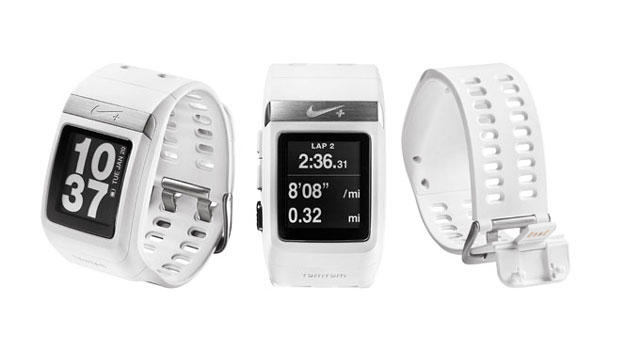
    Nike-SportWatch-640

    Sports brands have been doing a good job of making personal fitness hip in recent years while at the same time encouraging people to record and broadcast their activity using a range of performance metrics and gadgets.

    The Nike+ SportWatch GPS is the perfect embodiment of this trend. Unfortunately, it’s better on the drawing board than it is on the track or road.

    Launched in 2011, the Nike+ SportWatch GPS has gone through a number of iterations that have seen new colours introduced and firmware updates that have added functionality like support for Nike’s mysterious metric it calls NikeFuel points, and the ability calculate and display average pace.

    Whether it’s because we’ve bought into the hype, or because we’re attempting to keep the ageing process at bay, members of the TechCentral team have been running a great deal in the past year and, like many enthusiastic amateurs, we’ve been using our smartphones to track our outings and analyse our progress over time. It’s little wonder, then, that we leapt at the chance to try Nike’s GPS watch.

    With built-in GPS powered by navigation company TomTom, the ability to measure time and distance while calculating both instantaneous and average pace, and an LCD display, the SportWatch is essentially a wrist-sized, massively crippled mobile phone.

    Sure, there are plenty of other sports watches on the market that offer the same sorts of features and add others — such as the ability to measure and record your heart rate – but for the budding running enthusiast it’s going to mean replacing a smartphone and accompanying running application.

    We’ve been using the Nike+ Running smartphone application for months, and its online interface is the same one that the SmartWatch uses to store and compare information for each outing.

    The Web interface is excellent, showing you everything from replays of your recorded runs and the various milestones you’ve reached to tabling your progress over time and showing you how well you measure up against your friends.

    Getting the SportWatch’s data into the Nike+ database requires plugging it in to the USB port on a computer and using a piece of proprietary software to scrape the data from the watch.

    The same piece of software allows you to adjust settings such as whether the display is black text on a white background or the reverse and to turn off the infuriating default beeping that otherwise accompanies every press of a button. It also allows you to pick which measurement you’d like featured on the watch face while you’re running.

    The software and the degree to which the SmartWatch can be customised are underwhelming. Nike could easily have offered half a dozen clock faces or even simply a selection of typefaces for the two line digital display it’s settled on for displaying the time. Instead, there’s just one typeface and just one layout.

    Also, it should be possible to change which metric gets prominence on the display without having to tether it to a computer.
    Nike+ SmartWatch GPS shoe sensor
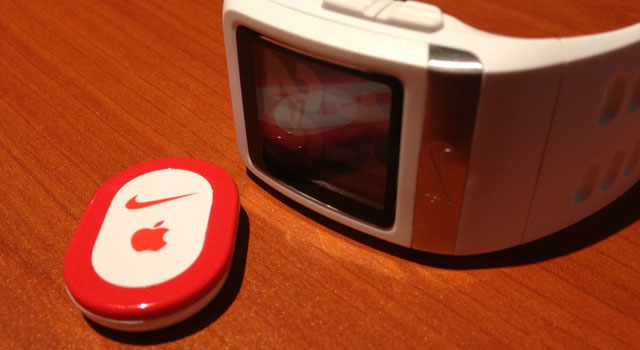
    Nike+ SmartWatch GPS shoe sensor
    The Nike SportWatch GPS charges and connects to a computer via USB
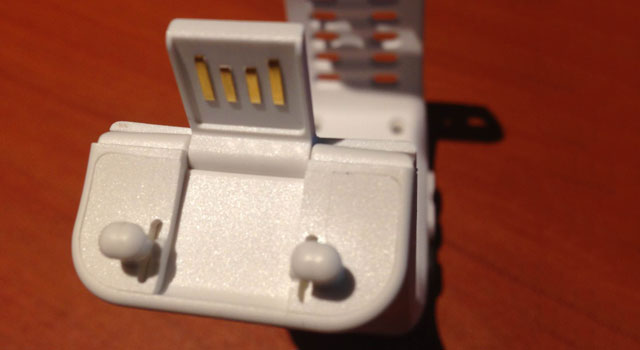
    The Nike SportWatch GPS charges and connects to a computer via USB

    We reviewed the white version of the SmartWatch –arguably the least practical colour for a device you’re likely to wear daily and sweat on.

    There’s also the issue of its size and weight. The SportWatch is a centimetre thick and, at 66g, it feels heavy for a wristwatch.

    We’d also have liked the device to measure heart rate, either through the wearer’s wrist or using an included sensor. Instead, in order to measure your heart rate you’ll need to invest in a Polar Wearlink+ Heart Rate Transmitter.

    Still, Nike does get some credit for including a sensor that can be placed in a shoe for instances where GPS coverage might be poor or when using a treadmill. The sensor is designed to fit in a slot beneath the insole of specific Nike shoes, but we found tucking it in the top of a sock equally effective.

    Tapping the SportWatch’s display activates the backlight, and there are three buttons on the left-hand side to toggle between the various display options and settings. The top two allow you to navigate up and down through the menus, while the third, silver button is used for making selections. Holding this button for three seconds will also start or end a run.

    Perhaps our biggest gripe about the SportWatch is that the time it takes to secure a GPS signal varies enormously. The first time we used the device, it took more than three minutes to get a GPS lock; the second time took just 10 seconds, and the third attempt took about a minute.

    The average person who runs no more than eight hours a week should have to charge the SportWatch only once a week. This is done using the USB connection that forms part of the clip at the end of the wrist strap.

    Overall, it’s tough to recommend the SportWatch over a smartphone that has the Nike+ application or an equivalent like RunKeeper, especially as a smartphone also allows you to listen to music and, in our experience, is no less accurate in its measurements.

    The only obvious benefit of the SportWatch is that it allows its wearer to see information at a glance, something that’s more difficult with a smartphone in a pocket or armband. Also, Nike says the watch is waterproof, unlike most smartphones.

    With a recommended retail price of R1 899, the SportWatch becomes an even more difficult proposition: for the same price, you could buy a capable heart-rate monitor, an armband for a smartphone, and a number of post-run breakfasts.

    Nike is to be commended for its efforts with the SmartWatch, but until the company can make the device slimmer, include functionality a phone can’t replicate, and latch onto GPS signal sooner, we’re going to stick to our smartphone apps.  — (c) 2013 NewsCentral Media

    Follow TechCentral on Google News Add TechCentral as your preferred source on Google


    Nike Nike+ Running Nike+ SportWatch Nike+ SportWatch GPS Nike+ SportWatch GPS review
    WhatsApp YouTube
    Share. Facebook Twitter LinkedIn WhatsApp Telegram Email Copy Link
    Previous ArticleInside Free State’s Web tender splurge
    Next Article Backspace: a tender process

    Related Posts

    From MTN to IBM: the tech industry's best slogans and payoff lines

    From MTN to IBM: the tech industry’s best slogans and payoff lines

    24 March 2025

    No ‘killer app’ will drive smart watch sales

    9 June 2014

    Smart watches not as dumb as they sound

    2 September 2013
    Company News
    Why online learning is the future of education - Mweb

    Why online learning is the future of education

    20 May 2026

    Best payment processing providers in Africa

    20 May 2026
    Network with industry leaders at Pan African DataCentres event

    Network with industry leaders at Pan African DataCentres event

    20 May 2026
    Opinion
    AI won't fix your culture - it will expose it - Jackie Kennedy

    AI won’t fix your culture – it will expose it

    19 May 2026
    Free calls, dead voice and Shameel Joosub's Spanish ghost - Duncan McLeod

    Free calls, dead voice and Shameel Joosub’s Spanish ghost

    22 April 2026
    The conflict of interest at the heart of PayShap's slow adoption - Cheslyn Jacobs

    The conflict of interest at the heart of PayShap’s slow adoption

    26 March 2026

    Subscribe to Updates

    Get the best South African technology news and analysis delivered to your e-mail inbox every morning.

    Latest Posts
    South Africa is sleepwalking into another AI policy failure - Celeste Labuschagne

    South Africa is sleepwalking into another AI policy failure

    20 May 2026
    Eskom to go to market for 5.2GW of new nuclear within a year

    Eskom to go to market for 5.2GW of new nuclear within a year

    20 May 2026
    The Mythos hacking threat is looking overblown

    The Mythos hacking threat is looking overblown

    20 May 2026
    Inflation spikes higher - and the worst is still to come

    Inflation spikes higher – and the worst is still to come

    20 May 2026
    © 2009 - 2026 NewsCentral Media
    • Cookie policy (ZA)
    • TechCentral – privacy and Popia

    Type above and press Enter to search. Press Esc to cancel.

    Manage consent

    TechCentral uses cookies to enhance its offerings. Consenting to these technologies allows us to serve you better. Not consenting or withdrawing consent may adversely affect certain features and functions of the website.

    Functional Always active
    The technical storage or access is strictly necessary for the legitimate purpose of enabling the use of a specific service explicitly requested by the subscriber or user, or for the sole purpose of carrying out the transmission of a communication over an electronic communications network.
    Preferences
    The technical storage or access is necessary for the legitimate purpose of storing preferences that are not requested by the subscriber or user.
    Statistics
    The technical storage or access that is used exclusively for statistical purposes. The technical storage or access that is used exclusively for anonymous statistical purposes. Without a subpoena, voluntary compliance on the part of your Internet Service Provider, or additional records from a third party, information stored or retrieved for this purpose alone cannot usually be used to identify you.
    Marketing
    The technical storage or access is required to create user profiles to send advertising, or to track the user on a website or across several websites for similar marketing purposes.
    • Manage options
    • Manage services
    • Manage {vendor_count} vendors
    • Read more about these purposes
    View preferences
    • {title}
    • {title}
    • {title}