Close Menu
TechCentralTechCentral

    Subscribe to the newsletter

    Get the best South African technology news and analysis delivered to your e-mail inbox every morning.

    Facebook X (Twitter) YouTube LinkedIn
    WhatsApp Facebook X (Twitter) LinkedIn YouTube
    TechCentralTechCentral
    • News
      Dina Pule, who oversaw Telkom crisis, is back in cabinet

      Dina Pule, who oversaw Telkom crisis, is back in cabinet

      1 July 2026
      Google plots E Cape as southern anchor of four-hub Africa network - Alex Okosi

      Google plots E Cape as southern anchor of four-hub Africa network

      1 July 2026
      Frontier AI has broken the old rules of cyber defence, warns Palo Alto CIO

      Frontier AI has broken the old rules of cyber defence, warns Palo Alto CIO

      1 July 2026
      Big change at top of Tarsus Distribution - Emile Burger

      Big change at top of Tarsus Distribution

      1 July 2026
      The AI utopia South Africa can't afford

      The AI utopia South Africa can’t afford

      1 July 2026
    • World

      SK Hynix ends Samsung’s 26-year reign at the top

      22 June 2026
      Google on the hook for what its AI tells users, court rules

      Google on the hook for what its AI tells users, court rules

      15 June 2026
      How Russians juggle VPNs to outwit the Kremlin

      How Russians juggle VPNs to outwit the Kremlin

      15 June 2026
      Amazon CEO flagged Anthropic AI risks to Washington - Andy Jassy

      Amazon CEO flagged Anthropic AI risks to Washington

      14 June 2026
      Trouble at Xbox

      Trouble at Xbox

      11 June 2026
    • In-depth
      AI boom sparks rally, frenzy and fear

      AI boom sparks rally, frenzy and fear

      11 June 2026
      Every plug-in hybrid on sale in South Africa, ranked by price - Lamborghini Temerario

      Every plug-in hybrid on sale in South Africa, ranked by price

      7 June 2026
      What Wi-Fi 8 will mean for wireless networks

      What Wi-Fi 8 will mean for wireless networks

      1 June 2026
      Alfa's electric rebel - Alfa Romeo Junior Elettrica Veloce

      Alfa’s electric rebel

      29 April 2026
      Africa switches on as Europe dims the lights

      Africa switches on as Europe dims the lights

      9 April 2026
    • TCS
      TCS+ | How Tracker is turning vehicle data into business strategy - Silvia Schollenberger

      TCS+ | How Tracker is turning vehicle data into business strategy

      1 July 2026
      TCS+ | IBM Bob: an AI-powered 'development partner' for the enterprise - David Spurway

      TCS+ | IBM Bob: an AI-powered development partner for the enterprise

      30 June 2026
      Watts & Wheels S1E6: 'A flawless Alfa and a bakkie that divides'

      Watts & Wheels S1E6: ‘A flawless Alfa and a bakkie that divides’

      17 June 2026
      Watts & Wheels S1E6: 'A flawless Alfa and a bakkie that divides'

      Watts & Wheels S1E5: ‘A Bentley of the bush and a car that swims’

      8 June 2026
      TCS | Charge's R1.8-billion bet on an off-grid EV future - Charge chairman Joubert Roux

      TCS | Charge’s R1.8-billion bet on an off-grid EV future

      18 May 2026
    • Opinion
      The author, Jannie van Zyl

      South Africa’s broadband future is being decided in orbit, not in Pretoria

      30 June 2026
      The pivot South Africa's MVNOs cannot afford to miss

      The pivot South Africa’s MVNOs cannot afford to miss

      23 June 2026
      Brazil's online gambling crackdown is a lesson for South Africa

      Brazil’s online gambling crackdown is a lesson for South Africa

      22 June 2026
      Finish the job Mandela started - Farzam Ehsani

      Finish the job Mandela started

      18 June 2026
      The author, Fanie van Rooyen

      The US just showed it can switch off our AI

      17 June 2026
    • Company Hubs
      • 1Stream
      • Africa Data Centres
      • AfriGIS
      • Altron Digital Business
      • Altron Document Solutions
      • Altron Group
      • Arctic Wolf
      • Ascent Technology
      • AvertITD
      • BBD
      • Braintree
      • CallMiner
      • CambriLearn
      • CM Telecom
      • Contactable
      • CYBER1 Solutions
      • Digicloud Africa
      • Digimune
      • Domains.co.za
      • ESET
      • Euphoria Telecom
      • HOSTAFRICA
      • Incredible Business
      • iONLINE
      • IQbusiness
      • Iris Network Systems
      • Kaspersky
      • LSD Open
      • Mitel
      • NEC XON
      • Netstar
      • Network Platforms
      • Next DLP
      • Ovations
      • Paracon
      • Paratus
      • Q-KON
      • SevenC
      • SkyWire
      • Solid8 Technologies
      • Telit Cinterion
      • Telviva
      • Tenable
      • Vertiv
      • Videri Digital
      • Vodacom Business
      • Wipro
      • Workday
      • XLink
    • Sections
      • AI and machine learning
      • Banking
      • Broadcasting and Media
      • Cloud services
      • Contact centres and CX
      • Cryptocurrencies
      • Education and skills
      • Electronics and hardware
      • Energy and sustainability
      • Enterprise software
      • Financial services
      • HealthTech
      • Information security
      • Internet and connectivity
      • Internet of Things
      • Investment
      • IT services
      • Lifestyle
      • Motoring
      • Policy and regulation
      • Public sector
      • Retail and e-commerce
      • Satellite communications
      • Science
      • SMEs and start-ups
      • Social media
      • Talent and leadership
      • Telecoms
    • Events
    • Advertise
    TechCentralTechCentral
    Home » Gadgets & Reviews » Passport review: BlackBerry’s back, baby

    Passport review: BlackBerry’s back, baby

    By Regardt van der Berg24 September 2014
    Twitter LinkedIn Facebook WhatsApp Email Telegram Copy Link
    News Alerts
    WhatsApp

    BlackBerry-Passport-640

    Who would have thought that one of the most interesting smartphones to be launched in 2014 would come from BlackBerry, Canadian smartphone manufacturer that many people had until recently written off as dead?

    The BlackBerry Passport is the first radically different device to be released under CEO John Chen, who took the reins from Thorsten Heins late last year.

    Chen is known for his skills in turning around failing businesses and most notably the work he did to save business software and services company Sybase, now part of SAP.

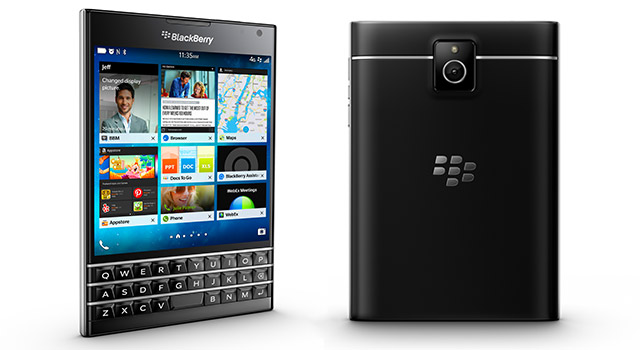
    The BlackBerry Passport, with its square-like design and three-row Qwerty keyboard, went on sale worldwide this week. TechCentral has been using it for the past week and, although sceptical initially, we’ve quickly warmed to its quirky looks. Turns out it’s hip to be square.

    The Passport is not the lightest phone around, weighing in at a chunky 196g, but it’s about as thin as most modern smartphones at just 9,3mm.

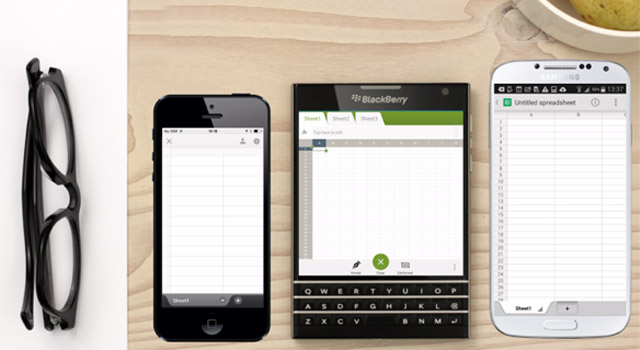
    Screen resolution is 1 440 x1 440 pixels for a very respectable pixel density of 453ppi. Indeed, it’s a higher rating than the pixel densities on top-end phones such as the HTC One M8 and the Nokia Lumia 930. The display is about a third wider than the average 5-inch smartphone, making it more suited for reading and viewing pictures.
    BlackBerry-Passport(2)-640

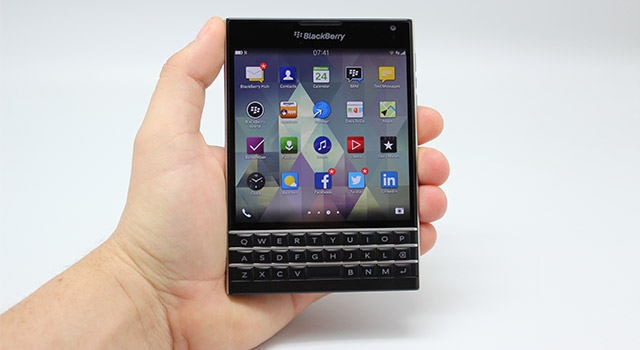
    The first time you use the Passport, it feels unlike any smartphone you’ve held. It can be a little awkward to hold at first as you allow your fingers to become familiar with the wider layout.

    The design is gorgeous — still classic Blackberry, but there’s a brushed metal frame around the edges, a design style that is also carried through to the keyboard. The back of the phone is a made of a soft, matte-like plastic.

    The keyboard will keep hardened BlackBerry users happy but it’s the support for touch gestures that steal the show here. By swiping your finger over the keyboard, you can scroll through any app or web page just as you would by swiping across a touch screen. It’s a small but genuinely handy feature that proves a real time saver when your fingers are glued to the keyboard while you type. Bravo!

    The Passport’s keys take a little getting used to because the screen is used to display other characters and functions not available as keys on the physical keyboard. It’s a system that works well enough once you get used the shortcut keys and gestures. The on-screen virtual keys are all within thumb reach and complement what already makes for a great typing experience. The keys are backlit, making replying to an e-mail at two in the morning easier.

    Having said that, the width of the device does not make it easy for one-handed operation. Unless you play in the Springbok back line or in America’s NBA league, you’ll probably need two hands to hold the Passport comfortably. There is also no tap-to-wake function on the screen, making the decision to place the power button at the top of device a design flaw. BlackBerry should have side-mounted the power button to make it easier to reach.

    Workhorse
    The Passport is the first BlackBerry to feature a quad-core processor. The phone comes with more memory and flash storage than any BlackBerry before it: 3GB of RAM and 32GB respectively.

    It has a 2,2GHz quad-core Qualcomm Snapdragon 801 processor, and there is a hot-swappable microSD. Unsurprisingly, the user interface is snappy and we had no speed issues when running multiple apps.

    Although it’s a workhorse, the Passport won’t let you down if you want to take photos or video. Its 13-megapixel rear camera shoots video at 1080p at 60fps, while the front of the phone has a 2-megapixel camera that can take video at the lesser 720p resolution. Both cameras feature video and image stabilisation technology.
    BlackBerry-Passport(1)-640

    BlackBerry has made sure all the latest technologies are built in. There is support for Bluetooth 4.0 and near-field communication. Its Wi-Fi works at 2,4GHz for 802.11b/g/n and at 5GHz for the a/n/ac variant. The popular 4G/LTE bands are supported, but not Telkom’s 2,3GHz. MTN and Vodacom subscribers won’t have an issue accessing 4G services.

    Battery life on the Passport is excellent, and we got just over a day’s worth of heavy usage on a single charge. The non-removable, well-endowed 3 450mAh battery is rated for talk time of about 18 hours and Blackberry says the phone has 18 days of standby time.

    The micro USB charging port at the bottom of the Passport also doubles as a display port to connect it to an HDMI enabled TV or projector using a SlimPort cable that can be purchased separately.

    The Passport runs the latest  Blackberry 10.3 operating system, which has a refreshed user interface and a great new feature called BlackBerry Blend. Blend gives users access to many of the phone’s features remotely, via a PC or tablet. It supports Windows, iOS, Android and Mac OS X. This means you can access apps and answer e-mails without having your phone by your side. The only thing you won’t be able to do is answer calls.

    For security-conscious users (and we all should be), BlackBerry Protect allows users to lock and wipe the smartphone remotely should it be lost or stolen.

    App support on the Passport is pretty comprehensive thanks to support for native BlackBerry apps in BlackBerry World and also HTML-based apps. The platform supports Android apps via Amazon’s app store, which greatly enhances the value proposition for users. The Amazon store comes pre-installed, but third-party app stores can also be downloaded to the phone. Amazon’s app store offers better security for downloaded apps as those apps are scanned for malware by BlackBerry Guardian.

    The BlackBerry Passport is certainly an interesting device at a time when smartphones are all starting to look remarkably similar. Its unconventional design works well, but it won’t be a hit with all sectors of the smartphone market. As a business device, the Passport is destined for great things, and heavy e-mail users will love it for its screen and comfortable keyboard.

    Local pricing and availability has not yet been announced, but it is expected to go on sale before the end of the year. US pricing has been confirmed at $599 without a contract.  — © 2014 NewsCentral Media

    Follow TechCentral on Google News Add TechCentral as your preferred source on Google


    BlackBerry BlackBerry Passport John Chen Passport
    WhatsApp YouTube
    Share. Facebook Twitter LinkedIn WhatsApp Telegram Email Copy Link
    Previous ArticleApple, Google change tack in smartphone war
    Next Article Coke machines in SA to dispense free Wi-Fi

    Related Posts

    What Gen Z really thinks about the tech world it inherited - Tinashe Mazodze

    What Gen Z really thinks about the tech world it inherited

    20 February 2026
    From Talkomatic to WhatsApp: the incredible history of instant messaging

    From Talkomatic to WhatsApp: the incredible history of instant messaging

    28 May 2024
    The 20 most influential tech products of all time

    The 20 most influential tech products of all time

    22 May 2024
    Company News
    A dead MacBook is a business problem - iAssist Apple Repairs

    A dead MacBook is a business problem

    1 July 2026
    7 tips to optimise your e-commerce website - Domains.co.za

    7 tips to optimise your e-commerce website

    1 July 2026
    A smarter switch for networks that can't afford to fail

    A smarter switch for networks that can’t afford to fail

    30 June 2026
    Opinion
    The author, Jannie van Zyl

    South Africa’s broadband future is being decided in orbit, not in Pretoria

    30 June 2026
    The pivot South Africa's MVNOs cannot afford to miss

    The pivot South Africa’s MVNOs cannot afford to miss

    23 June 2026
    Brazil's online gambling crackdown is a lesson for South Africa

    Brazil’s online gambling crackdown is a lesson for South Africa

    22 June 2026

    Subscribe to Updates

    Get the best South African technology news and analysis delivered to your e-mail inbox every morning.

    Latest Posts
    Dina Pule, who oversaw Telkom crisis, is back in cabinet

    Dina Pule, who oversaw Telkom crisis, is back in cabinet

    1 July 2026
    Google plots E Cape as southern anchor of four-hub Africa network - Alex Okosi

    Google plots E Cape as southern anchor of four-hub Africa network

    1 July 2026
    Frontier AI has broken the old rules of cyber defence, warns Palo Alto CIO

    Frontier AI has broken the old rules of cyber defence, warns Palo Alto CIO

    1 July 2026
    Big change at top of Tarsus Distribution - Emile Burger

    Big change at top of Tarsus Distribution

    1 July 2026
    © 2009 - 2026 NewsCentral Media
    Built and maintained by Chronon
    • Cookie policy (ZA)
    • TechCentral – privacy and Popia

    Type above and press Enter to search. Press Esc to cancel.

    Manage consent

    TechCentral uses cookies to enhance its offerings. Consenting to these technologies allows us to serve you better. Not consenting or withdrawing consent may adversely affect certain features and functions of the website.

    Functional Always active
    The technical storage or access is strictly necessary for the legitimate purpose of enabling the use of a specific service explicitly requested by the subscriber or user, or for the sole purpose of carrying out the transmission of a communication over an electronic communications network.
    Preferences
    The technical storage or access is necessary for the legitimate purpose of storing preferences that are not requested by the subscriber or user.
    Statistics
    The technical storage or access that is used exclusively for statistical purposes. The technical storage or access that is used exclusively for anonymous statistical purposes. Without a subpoena, voluntary compliance on the part of your Internet Service Provider, or additional records from a third party, information stored or retrieved for this purpose alone cannot usually be used to identify you.
    Marketing
    The technical storage or access is required to create user profiles to send advertising, or to track the user on a website or across several websites for similar marketing purposes.
    • Manage options
    • Manage services
    • Manage {vendor_count} vendors
    • Read more about these purposes
    View preferences
    • {title}
    • {title}
    • {title}